

Intro
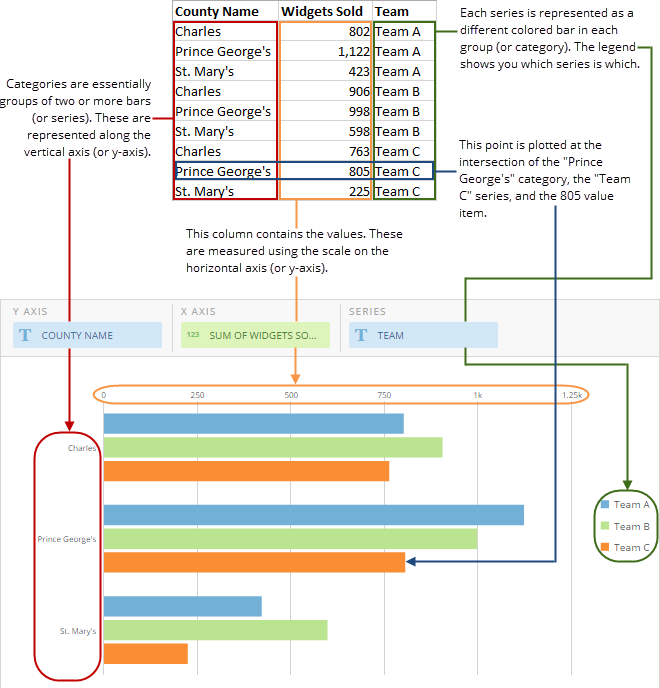
grouped bar charts are Bar charts in which multiple sets of data items are compared, with a single color used to denote a specific series across all sets. As with basic Bar charts, both vertical and horizontal versions of grouped bar charts are available.Powering grouped bar charts
Grouped bar charts require three columns or rows of data from your DataSet—one for series, one for categories, and one for values. If you have more than two series, each additional series is implemented as an additional bar. For information about value, category, and series data, see Understanding Chart Data. In the Analyzer, you choose the columns containing the data for your grouped bar chart. For more information about choosing data columns, see Applying DataSet Columns to Your Chart. For more information about formatting charts in the Analyzer, see Visualization Card Building Part 2: The Analyzer. The following graphic shows you how the data from the series, categories, and values columns in a typical column-based spreadsheet is converted into a vertical grouped bar chart: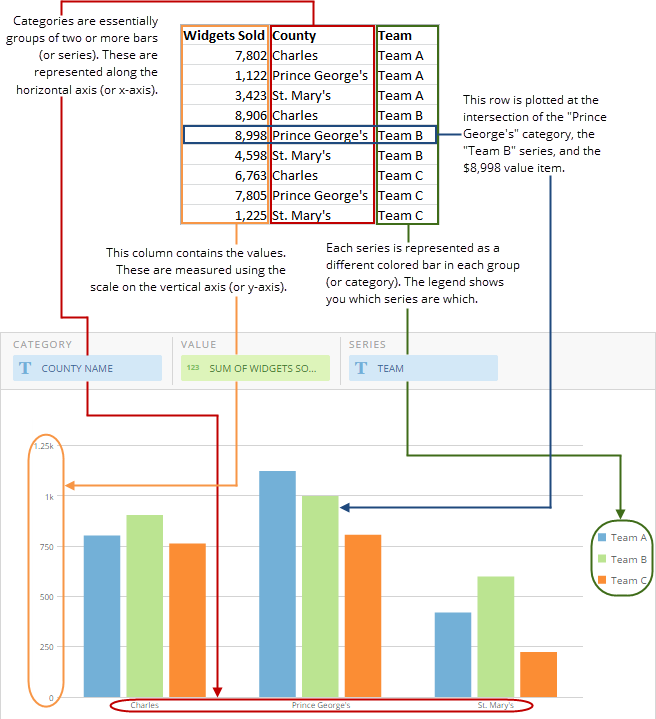
Customizing grouped bar charts
You can customize the appearance of a grouped bar chart by editing its Chart Properties. For information about all chart properties, see Chart Properties.| General > Sort Each Category | Allows you to sort the items in each individual category in most kinds of multi-series bar and lollipop charts. You can choose an ascending or descending sort. If you select Default , the default sort is applied. This option does not work when the Value Scale > Log Scale box is checked. In the example at right, bars within all categories are sorted in descending order. | 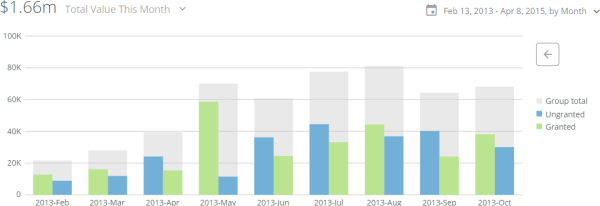 |
| General > Sort on Totals | Allows you to sort categories in many kinds of bar and lollipop charts by their total values, in either ascending or descending order. If you select Default , the default sort is applied. This option does not work when the chart has automatic time scaling applied. (You can turn off automatic time scaling by checking the box for Category Scale > Never Use Time Scale . In the example at right, the categories are sorted by their totals in ascending order. |  |