

Intro
Snowflake OAuth Unload is a cloud-based analytic data warehouse system. Use Domo’s Snowflake OAuth Unload connector to unload data from your Snowflake database into Amazon S3. The files are downloaded from S3 into Domo. To use this connector, you must have your Snowflake account name, and the client ID and client secret provided by Snowflake when the client is registered. Choose this connector instead of the Snowflake connector if you are executing very large queries. For more information about the Snowflake API, go to https://docs.snowflake.net/manuals. The Snowflake OAuth Unload connector is a “Database” connector, meaning it retrieves data from a database using a query. In the Data Center, you can access the connector page for this and other Database connectors by clicking Database in the toolbar at the top of the window. You connect to your Snowflake account in the Data Center. This topic discusses the fields and menus that are specific to the Snowflake OAuth Unload connector user interface. General information for adding DataSets, setting update schedules, and editing DataSet information is discussed in Adding a DataSet Using a Data Connector.Best Practices
Prerequisites
To connect to your Snowflake database account and create a DataSet, you must have the following:-
The full name of your account (provided by Snowflake). This is the portion of your Snowflake URL immediately following
https://. Note that your full account name may include additional segments that identify the region and cloud platform where your account is hosted. The following table provides account name examples by cloud platform/region. For each row, it assumes your account name is “xy12345.”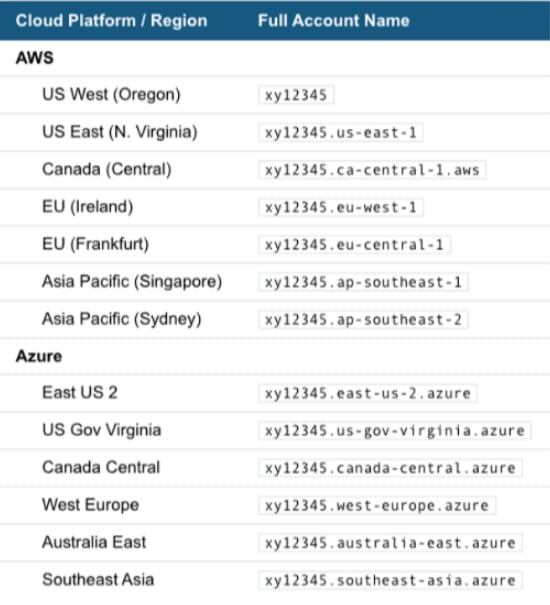
- Client ID provided by Snowflake when the client is registered.
- Client secret provided by Snowflake when the client is registered.
- Your AWS access key. It is available in the AWS Console in the Security Credentials section or under Users if you are using IAM.
- Your AWS secret key, which was provided when you created your Access Key. You can generate a new one in the AWS Console.
- The name of the AWS S3 bucket that your Snowflake data will be unloaded into.
- Your S3 bucket region.
Connect to Your Snowflake Account
This section enumerates the options in the Credentials and Details panes in the Snowflake OAuth Unload Connector page. The components of the other panes in this page, Scheduling and Name & Describe Your DataSet, are universal across most connector types and are discussed in greater length in Adding a DataSet Using a Data Connector.Credentials Pane
This pane contains fields for entering credentials to connect to your Snowflake account. The following table describes what is needed for each field:
Once you have entered valid Snowflake credentials, you can use the same account any time you go to create a new Snowflake OAuth Unload DataSet. You can manage connector accounts in the Accounts tab in the Data Center. For more information about this tab, see Managing User Accounts for Connectors.
Details Pane
This pane contains a primary Reports menu, along with various other menus which may or may not appear depending on the report type you select.Other Panes
For information about the remaining sections of the connector interface, including how to configure scheduling, retry, and update options, see Adding a DataSet Using a Data Connector.FAQ
When should I use this connector?
When should I use this connector?
The Snowflake OAuth Unload Connector optimizes Snowflake data imports by unloading data to a user-defined S3 bucket, before importing the data from S3 to Domo. This connector is suitable for datasets of any size, but performance gains are most noticeable in larger datasets. Once connected, you will be able to replace the entire dataset, append new rows, or merge/upsert new or updated rows. This connector does not support partitions.
I am receiving an error saying, "OAuth access token expired." Why?
I am receiving an error saying, "OAuth access token expired." Why?
To avoid this error, you need to refresh the token. Snowflake asserts your need to manually re-connect your Domo account every time the account expires. The Snowflake integration controls how often the account will expire. If it is set to expire the refresh tokens every 90 days, then you will need to reconnect the account every 90 days. If you would like to increase the refresh timeout to more than 90 days, then you will need to contact Snowflake Support, and they can increase the maximum timeout from 90 days to 1 year.
What kind of credentials do I need to power up this connector?
What kind of credentials do I need to power up this connector?
You need the full name of your Snowflake account, and the client ID and client secret provided by Snowflake when the client is registered. You may also provide your role.
Are there any API limits that I need to be aware of?
Are there any API limits that I need to be aware of?
Limits depend on your server configuration.
How frequently will my data update?
How frequently will my data update?
Datasets can run as often as every 15 minutes. However, depending on the runtime of the query, datasets may need to run less frequently.
What do I need to be aware of while writing a query?
What do I need to be aware of while writing a query?
Make sure that all the words, table names, and field names are correctly spelled. Refer to the Query Helper field for query help.
Why can't I connect to my Snowflake database? Do I need to whitelist any IP addresses?
Why can't I connect to my Snowflake database? Do I need to whitelist any IP addresses?
Before you can connect to a Snowflake database, you must also whitelist a number of IP addresses on your database server on the port you want to connect to. For the full list of IP addresses, see Whitelisting IP Addresses.