> ## Documentation Index
> Fetch the complete documentation index at: https://www.domo.com/docs/llms.txt
> Use this file to discover all available pages before exploring further.
# Requesting Custom Environments
## Intro
You can use the Scripting tiles in Magic ETL to automate data processing and data science workflows. For an overview, see [Magic ETL Tiles: Scripting](/docs/s/article/360045485833).
In this article, we'll provide an overview of your default environment and how to add a custom environment for R and Python that meets your DataFlow needs.
**Note:**
Scripting tiles are available by default to customers on the Domo Consumption agreement.
For non-consumption users, the tiles are available
*on demand*
and
*paid*
. To enable Scripting tiles, contact your Domo account team. You may need to complete training before you can use them.
## Default Environment
Domo 1.1 is your default environment. It includes over 400 R and Python packages.
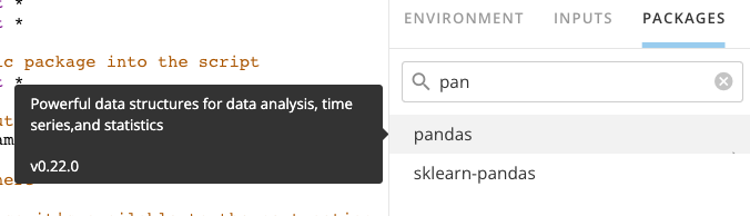
 To see the list of packages and versions included in your environment, select **Packages**. You can select a package to see its description and version.

 ## Custom Environment
You can issue a custom environment in your Domo instance by submitting a request to Domo Support. You can create custom environments for both R and Python, based on your needs.
Please include these items in your request to the Support team:
* The name you would like to use for the new environment.
*Example:* *“Custom-Py”.*
* A description of the new environment.
* The version of Python or R needed.
* The list of packages and respective versions (or minimal version.)
**Important:**
Custom environments do not contain all the packages included in the default environment. If a script is relying on a package available in the default environment, that package will need to be specified in the request for the custom environment.
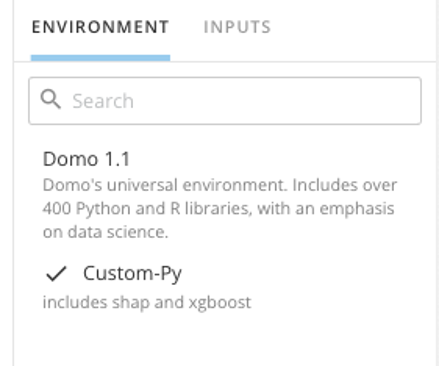
Your new environment will appear under **Environment**, and you will be able to select it for your DataFlow.
## Custom Environment
You can issue a custom environment in your Domo instance by submitting a request to Domo Support. You can create custom environments for both R and Python, based on your needs.
Please include these items in your request to the Support team:
* The name you would like to use for the new environment.
*Example:* *“Custom-Py”.*
* A description of the new environment.
* The version of Python or R needed.
* The list of packages and respective versions (or minimal version.)
**Important:**
Custom environments do not contain all the packages included in the default environment. If a script is relying on a package available in the default environment, that package will need to be specified in the request for the custom environment.
Your new environment will appear under **Environment**, and you will be able to select it for your DataFlow.