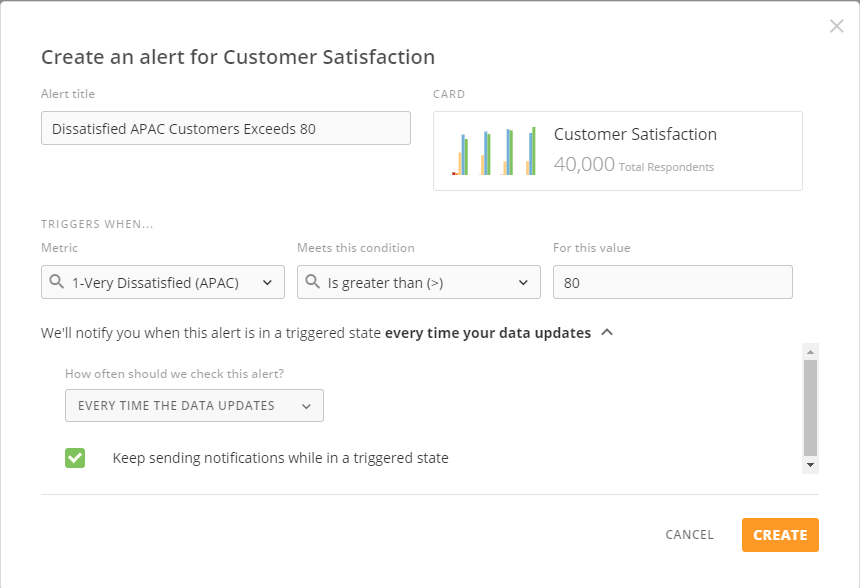
 For more information, see [Creating an Alert for a Visualization Card](/s/article/360043430513).
#### Alert Sharing
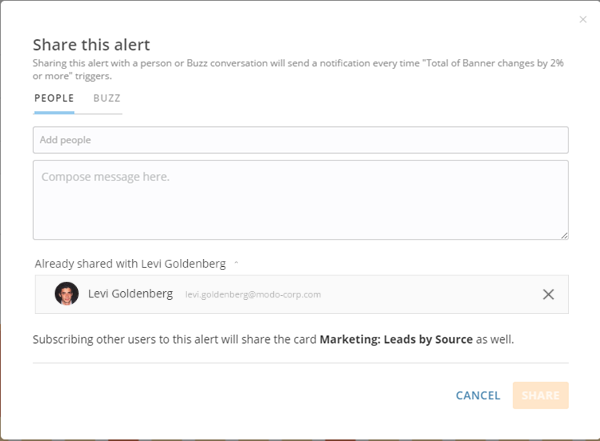
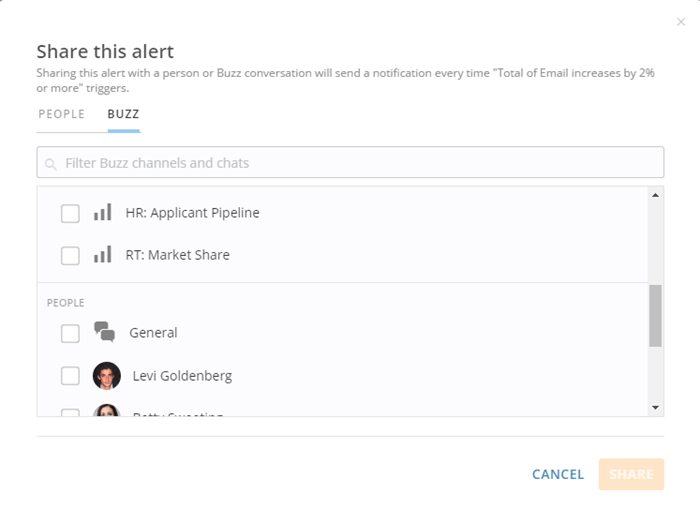
Get the right alerts into the hands of the right people using the new Alert Sharing feature. You can now share alerts with other users in your Domo so they receive notifications every time that alert triggers. You can also share alerts in Buzz conversations, in which case all users following the conversation receive notifications. Alert sharing allows you to create business alignment by providing shared understanding on critical data conditions.
By popular demand, we also support the ability to share an alert with a group. It is now even easier to align your team on the most critical business conditions. No longer do you need to add each of your team members individually.
For more information, see [Creating an Alert for a Visualization Card](/s/article/360043430513).
#### Alert Sharing
Get the right alerts into the hands of the right people using the new Alert Sharing feature. You can now share alerts with other users in your Domo so they receive notifications every time that alert triggers. You can also share alerts in Buzz conversations, in which case all users following the conversation receive notifications. Alert sharing allows you to create business alignment by providing shared understanding on critical data conditions.
By popular demand, we also support the ability to share an alert with a group. It is now even easier to align your team on the most critical business conditions. No longer do you need to add each of your team members individually.
 #### Mobile Alerts
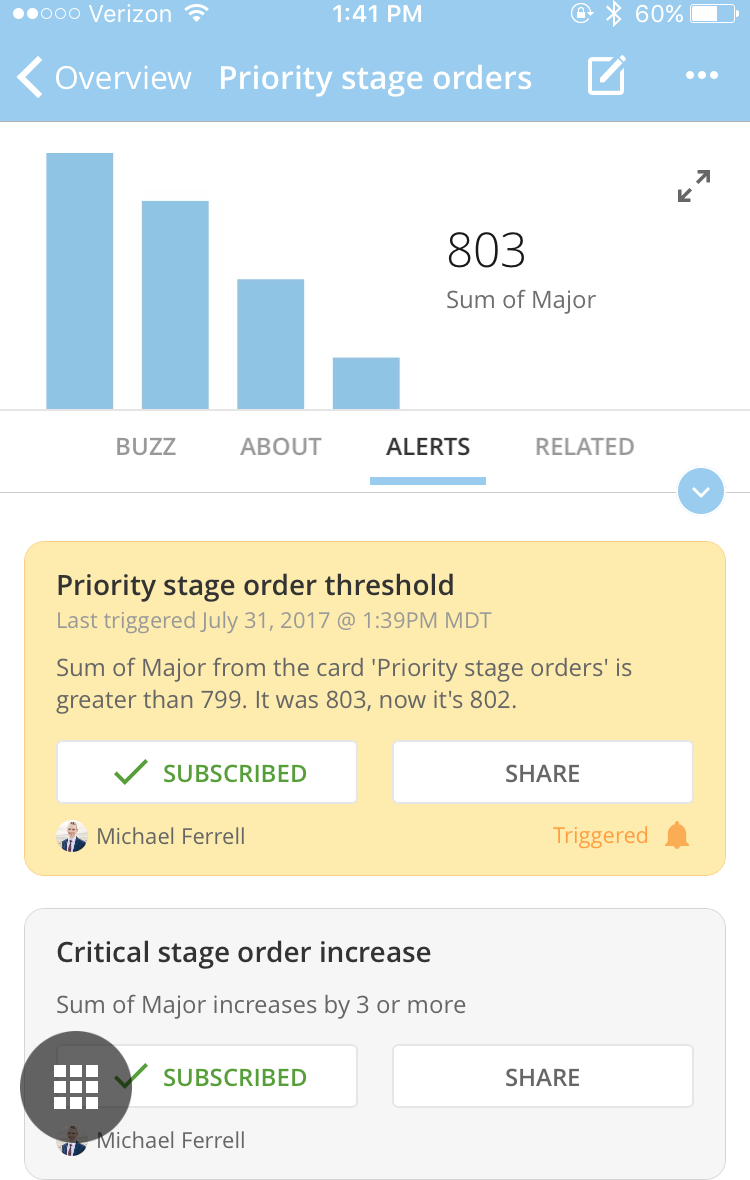
We now provide native alert support for the iOS and Android applications. Alerts enable you to set custom thresholds to be notified when your business KPIs hit a defined limit. This enables you to run your business even more seamlessly. In addition to the power of alerts, Domo users can now receive push notifications for any subscribed triggered alert and be taken right to the card within their native apps. In the card, you can find detailed information about the alert so you can dig in to fully understand the reason for the alert. Available in the iOS and Android app updates.
#### Mobile Alerts
We now provide native alert support for the iOS and Android applications. Alerts enable you to set custom thresholds to be notified when your business KPIs hit a defined limit. This enables you to run your business even more seamlessly. In addition to the power of alerts, Domo users can now receive push notifications for any subscribed triggered alert and be taken right to the card within their native apps. In the card, you can find detailed information about the alert so you can dig in to fully understand the reason for the alert. Available in the iOS and Android app updates.
 ### Chart Updates
The following additions and updates have been made to the visualization experience in Domo:
* A new chart type, 100% Stacked Bar with Line, is now available.
### Chart Updates
The following additions and updates have been made to the visualization experience in Domo:
* A new chart type, 100% Stacked Bar with Line, is now available.
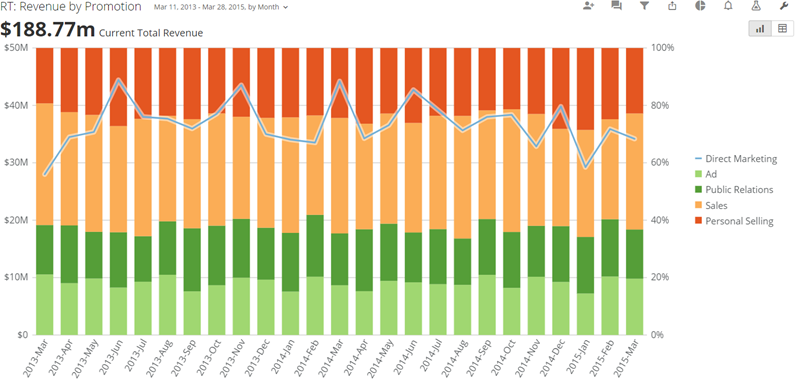 For more information, see [100% Stacked Bar with Line Graph](/s/article/360042923854 "100% Stacked Bar with Line Graph").
* Two new country maps have been added:
* The Philippines. For more information, see
[Country Map](/s/article/360043429033 "Country Map").
* Post-2015 France. This map includes updated regional divisions as per the changes that went into effect on January 1, 2016. The legacy version of the map will continue to be available. For more information, see
[Country Map](/s/article/360043429033 "Country Map").
* Another new map, U.S. State, lets you show county-level data for specific states. All you need to power a U.S. State chart is a column with FIPS (county) data and your value column.
For more information, see [100% Stacked Bar with Line Graph](/s/article/360042923854 "100% Stacked Bar with Line Graph").
* Two new country maps have been added:
* The Philippines. For more information, see
[Country Map](/s/article/360043429033 "Country Map").
* Post-2015 France. This map includes updated regional divisions as per the changes that went into effect on January 1, 2016. The legacy version of the map will continue to be available. For more information, see
[Country Map](/s/article/360043429033 "Country Map").
* Another new map, U.S. State, lets you show county-level data for specific states. All you need to power a U.S. State chart is a column with FIPS (county) data and your value column.
 For more information, see [U.S. County Map](/s/article/360042925074 "U.S. County Map").
* You now have the ability to set line or range scale markers dynamically based on a percentile, percentage, or standard deviation. You can also include scale markers based on quantiles (shown in the following example).
For more information, see [U.S. County Map](/s/article/360042925074 "U.S. County Map").
* You now have the ability to set line or range scale markers dynamically based on a percentile, percentage, or standard deviation. You can also include scale markers based on quantiles (shown in the following example).
 For more information about these properties, see [Adding Scale Markers to Your Chart](/s/article/360042925194 "Adding a Scale Marker Range to Your Chart").
* Various new properties have been implemented for customizing legends, hover legends, and data labels in pie-type graphs. For more information, see
[Properties for Pie-Type Charts](/s/article/360042925314 "Properties for Pie-Type Charts").
* You can now set custom sizing on table cards in the card view when the "Full Size" option is selected—anywhere from 1 to 6 card sizes in both width and height.
For more information about these properties, see [Adding Scale Markers to Your Chart](/s/article/360042925194 "Adding a Scale Marker Range to Your Chart").
* Various new properties have been implemented for customizing legends, hover legends, and data labels in pie-type graphs. For more information, see
[Properties for Pie-Type Charts](/s/article/360042925314 "Properties for Pie-Type Charts").
* You can now set custom sizing on table cards in the card view when the "Full Size" option is selected—anywhere from 1 to 6 card sizes in both width and height.
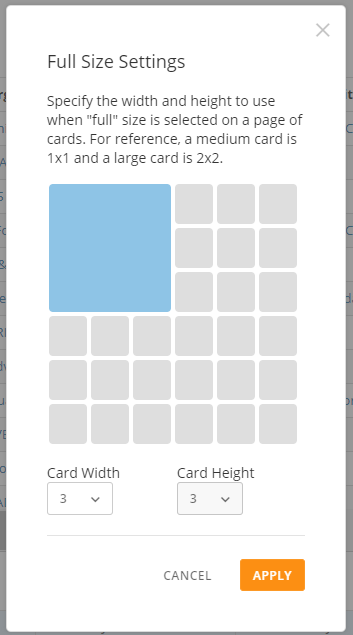 For more information, see [Changing the Size of Cards in a Page](/s/article/360042923594 "Changing the Size of Cards in a Page").
* You can access table formatting and total/subtotal options from the column dropdowns above your table preview, allowing you to make quick customizations to specific columns in your table.
### Duplicate Page
Domo now provides a **Save As** option for pages, which allows you to copy all content, collections, layouts, card sizes, and filters. This results in a new page with all content and settings duplicated.
Using this option, you can duplicate a page with all of the following elements copied:
* Cards
* Card sizes
* Filters built into cards using Analyzer
* Collections
* Page-level filters
This option does *not* copy the following elements from pages:
* Sub-pages
* Temporary filters created at the card Details level
* Alerts on cards
* Scheduled reports
* Users the original page was being shared with
You can access this option by selecting **Save As** in the wrench menu for the page. You then enter the desired name for the new page, indicate whether you want to open the new page after you save, then save the changes.
For more information, see [Changing the Size of Cards in a Page](/s/article/360042923594 "Changing the Size of Cards in a Page").
* You can access table formatting and total/subtotal options from the column dropdowns above your table preview, allowing you to make quick customizations to specific columns in your table.
### Duplicate Page
Domo now provides a **Save As** option for pages, which allows you to copy all content, collections, layouts, card sizes, and filters. This results in a new page with all content and settings duplicated.
Using this option, you can duplicate a page with all of the following elements copied:
* Cards
* Card sizes
* Filters built into cards using Analyzer
* Collections
* Page-level filters
This option does *not* copy the following elements from pages:
* Sub-pages
* Temporary filters created at the card Details level
* Alerts on cards
* Scheduled reports
* Users the original page was being shared with
You can access this option by selecting **Save As** in the wrench menu for the page. You then enter the desired name for the new page, indicate whether you want to open the new page after you save, then save the changes.
 For more information, see [Duplicating Pages](/s/article/360043428273 "Duplicating Pages").
### Bulk Add Users
You can now easily add teams, departments, and organizations to your Domo instance in a single action. The new "Bulk Add" feature enables you to provide a list of people you want to add to your Domo instance. The file just needs to be in CSV format and include, at a minimum, a list of email addresses and display names.
All you need to do to import your list of users is go into **Admin > People > Bulk Add** and follow the instructions. You can even download a sample CSV file that shows you how your list should be formatted. The days of adding users to Domo one by one are over!
For more information, see [Duplicating Pages](/s/article/360043428273 "Duplicating Pages").
### Bulk Add Users
You can now easily add teams, departments, and organizations to your Domo instance in a single action. The new "Bulk Add" feature enables you to provide a list of people you want to add to your Domo instance. The file just needs to be in CSV format and include, at a minimum, a list of email addresses and display names.
All you need to do to import your list of users is go into **Admin > People > Bulk Add** and follow the instructions. You can even download a sample CSV file that shows you how your list should be formatted. The days of adding users to Domo one by one are over!
 For more information, see [Adding Users to Domo](/s/article/360042934274 "Adding Users to Domo in Bulk").
### New Self-Service Connectors
This month we have polished and released another 49 connectors that are now available to all customers in their Domo account. These connectors are self-service, so you no longer need to contact support to get help powering them up. Here are the new connectors. Note that documentation is still in progress for many of these connectors, so please bear with us!
For more information, see [Adding Users to Domo](/s/article/360042934274 "Adding Users to Domo in Bulk").
### New Self-Service Connectors
This month we have polished and released another 49 connectors that are now available to all customers in their Domo account. These connectors are self-service, so you no longer need to contact support to get help powering them up. Here are the new connectors. Note that documentation is still in progress for many of these connectors, so please bear with us!
Connector | Link to Knowledge Base article |
|---|---|
AD EBiS | |
AdGear | AdGear Connector |
AppNexus Log-Level | |
ArcSight | |
Amazon Web Services Billing | |
BlueHornet | |
BrightCove | |
Cake | Cake Connector |
Channel Advisor | ChannelAdvisor Connector |
CheetahMail | CheetahMail Connector |
Christopherson Business Travel | Third-party connector--no documentation available from Domo |
Clarizen | |
ClickPoint | |
CJ Affiliate (formerly called Commission Junction) | |
Coupa | |
Dial800 | |
Dovetale | Third-party connector--no documentation available from Domo |
Dropbox for Business Advanced | |
Engine Ready | |
eQuest | |
Foresee | |
GinzaMetrics | |
Google AdWords | Google AdWords Connector |
Google+ Advanced | Google+ Advanced Connector |
HappyOrNot | HappyOrNot Connector |
Informatica Cloud Plugin | |
InMoment | InMoment Connector |
Ivinex | Ivinex Connector |
Custom JSON | IN PROGRESS |
Kapost | |
Kenshoo | IN PROGRESS |
Kounta | Kounta Connector |
| Neurio | Neurio Connector |
| Nuvi | IN PROGRESS |
Olo | Olo Connector |
Oracle Bronto | Bronto Connector |
PlayVox | |
ProBusinessTools | |
Qubole | Qubole Connector |
RemedyForce | |
Sizmek | Sizmek Connector |
SpringServe | SpringServe Connector |
Synthesio | |
Sysomos Expion | |
Totango | |
Weather Underground | Weather Underground Connector |
WhatCounts | |
Wrike | |
Yext | Third-party connector--no documentation available from Domo |

 For more information about inviting, see [Inviting Others to Join Domo](/s/article/360043438893 "Inviting Others to Join Domo").
### Getting Help
You can view the latest release notes information in the Help Center, which you can access from Domo by clicking **> Help Center**.
If you have questions about Domo,
* search for a topic in the Help Center
* train in Domo University at
[http://www.domo.com/university](http://www.domo.com/university "http://www.domo.com/university")
* get answers in the Domo Community at
[https://dojo.domo.com](https://dojo.domo.com "https://dojo.domo.com")
* contact Technical Support by entering a help ticket in the Domo Support Portal, by sending a Buzz message to `\support`, or by emailing [support@domo.com](mailto:support@domo.com "support@domo.com").
* reach out to your Domo Customer Success Manager or Technical Consultant
If you have feedback, please send it from within Domo ( **> Feedback**). Or send an email to [product.feedback@domo.com](mailto:product.feedback@domo.com "product.feedback@domo.com").
For more information about getting help, see [Getting Help](/s/article/360042922874 "Getting Help").
For more information about inviting, see [Inviting Others to Join Domo](/s/article/360043438893 "Inviting Others to Join Domo").
### Getting Help
You can view the latest release notes information in the Help Center, which you can access from Domo by clicking **> Help Center**.
If you have questions about Domo,
* search for a topic in the Help Center
* train in Domo University at
[http://www.domo.com/university](http://www.domo.com/university "http://www.domo.com/university")
* get answers in the Domo Community at
[https://dojo.domo.com](https://dojo.domo.com "https://dojo.domo.com")
* contact Technical Support by entering a help ticket in the Domo Support Portal, by sending a Buzz message to `\support`, or by emailing [support@domo.com](mailto:support@domo.com "support@domo.com").
* reach out to your Domo Customer Success Manager or Technical Consultant
If you have feedback, please send it from within Domo ( **> Feedback**). Or send an email to [product.feedback@domo.com](mailto:product.feedback@domo.com "product.feedback@domo.com").
For more information about getting help, see [Getting Help](/s/article/360042922874 "Getting Help").