> ## Documentation Index
> Fetch the complete documentation index at: https://www.domo.com/docs/llms.txt
> Use this file to discover all available pages before exploring further.

# System Roles | Reference

## Intro

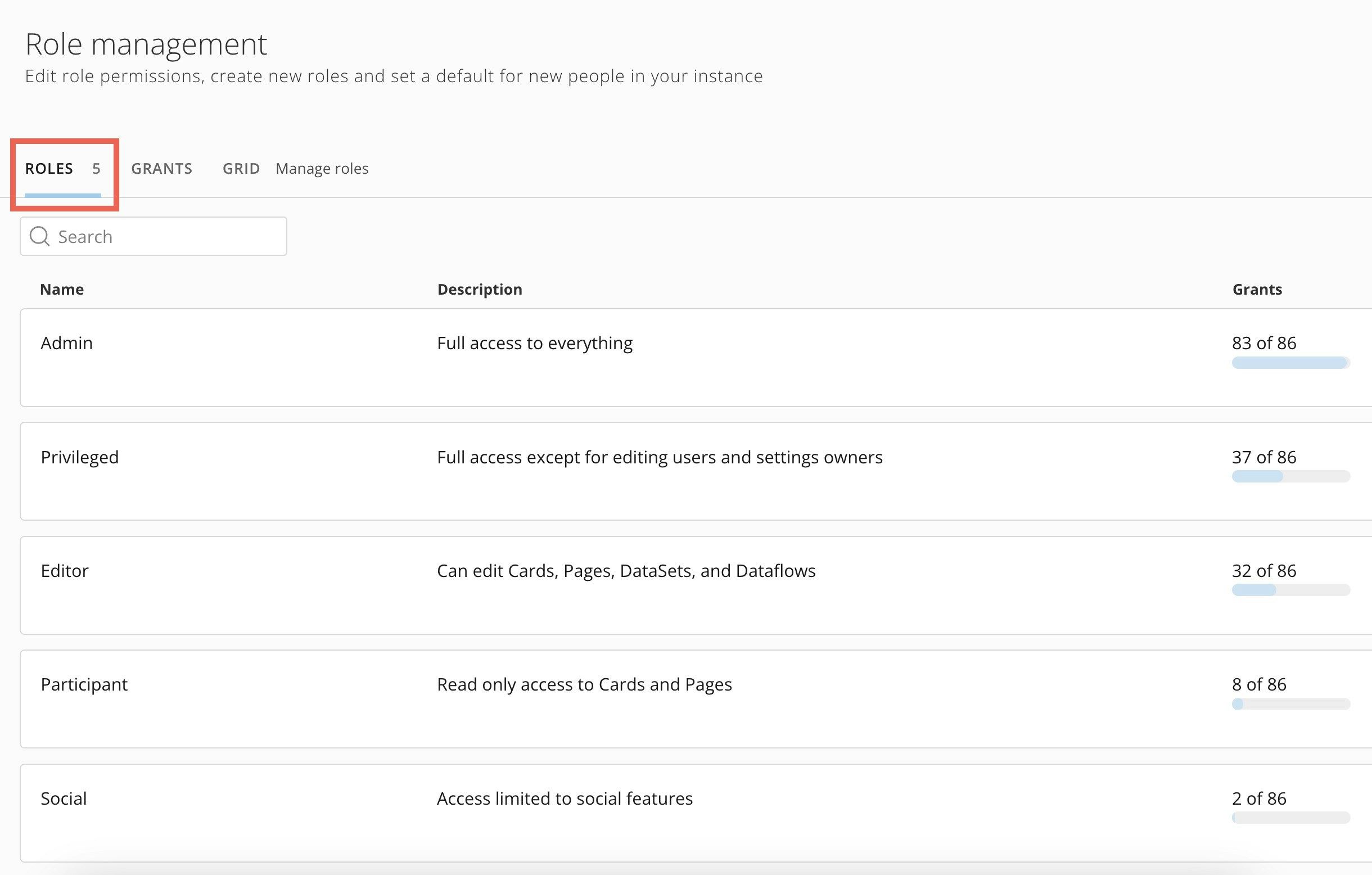
There are five system roles in Domo:

* Admin
* Privileged\*
* Editor
* Participant
* Social

*\*Privileged is the default role for new users in Domo unless an admin [changes the default role](/docs/s/article/360043438973).*

Each system role includes various grants, or specific permissions, to parts of the Domo platform and to perform various tasks. When a person is assigned a system role, they are given the grants included with that role.

While you can't edit a system role, you can [duplicate](/docs/s/article/360043438973)

a system role, make changes to it, and save it as a new custom role. To learn more about creating other custom roles and assigning grants, see [Manage Roles](/docs/s/article/360043438973).

This article describes the differences between each of the five system roles. Social gives the most basic access—each subsequent role includes all the same grants as the role below it plus additional grants. The Admin role gives access to nearly all available grants. Learn more about [Admin](#admin) below.

## Social

Social is the most basic system role. It only allows access to [Buzz](/docs/s/article/360042925574), [user profiles](https://domo-support.domo.com/s/topic/0TO5w000000ZaoLGAS/user-profile?language=en_US), and [Projects and Tasks](https://domo-support.domo.com/s/topic/0TO5w000000Zao5GAC/projects-and-tasks?language=en_US).

Social users can subscribe to existing [alerts](/docs/s/article/360043430533) and create OAuth clients for access tokens to authenticate to the Domo platform API.

In the web version of Domo, social users cannot open dashboards to view included cards.

## Compare Participant, Editor, and Privileged Roles

The Participant, Editor, and Privileged roles include all Social role access. This table describes which additional access each role includes.

<Note>
  **Note:** Privileged is the default role for new Domo users unless [changed](/docs/s/article/360043438973) by an admin.
</Note>

<table border="1" cellpadding="1" cellspacing="1" data-aura-rendered-by="33:209;a"><thead><tr><th colspan="1" rowspan="1"><p> Feature </p></th><th colspan="1" rowspan="1"><p> Access </p></th><th colspan="1" rowspan="1"><p> Participant </p></th><th colspan="1" rowspan="1"><p> Editor </p></th><th colspan="1" rowspan="1"><p> Privileged </p></th></tr></thead><tbody><tr><td colspan="1" rowspan="2"><p><b> Alerts </b></p></td><td colspan="1" rowspan="1"><p> Create, edit, and share <a href="/docs/s/article/360043430533" target="_self"> alerts </a> to which they have access. </p></td><td colspan="1" rowspan="1"><p><i className="icon-check-square-fill text-green-600 md" role="img" aria-label="Yes" /></p></td><td colspan="1" rowspan="1"><p><i className="icon-check-square-fill text-green-600 md" role="img" aria-label="Yes" /></p></td><td colspan="1" rowspan="1"><p><i className="icon-check-square-fill text-green-600 md" role="img" aria-label="Yes" /></p></td></tr><tr><td colspan="1" rowspan="1"><p> View, edit, add, or delete Alert Actions on any Alert they own. </p></td><td colspan="1" rowspan="1"><i className="icon-x text-red-600 md" role="img" aria-label="No" /></td><td colspan="1" rowspan="1"><i className="icon-check-square-fill text-green-600 md" role="img" aria-label="Yes" /></td><td colspan="1" rowspan="1"><i className="icon-check-square-fill text-green-600 md" role="img" aria-label="Yes" /></td></tr><tr><td colspan="1" rowspan="3"><p><b> Appstore </b></p></td><td colspan="1" rowspan="1"><p> View the <a href="/docs/s/article/360043438013" target="_self"> Domo Appstore </a> and app info. </p></td><td colspan="1" rowspan="1"><i className="icon-check-square-fill text-green-600 md" role="img" aria-label="Yes" /></td><td colspan="1" rowspan="1"><i className="icon-check-square-fill text-green-600 md" role="img" aria-label="Yes" /></td><td colspan="1" rowspan="1"><p><i className="icon-check-square-fill text-green-600 md" role="img" aria-label="Yes" /></p></td></tr><tr><td colspan="1" rowspan="1"><p><a href="/docs/s/article/000005182" target="_self"> Install and use apps </a> from the Domo Appstore. </p></td><td colspan="1" rowspan="1"><p><i className="icon-x text-red-600 md" role="img" aria-label="No" /></p></td><td colspan="1" rowspan="1"><i className="icon-check-square-fill text-green-600 md" role="img" aria-label="Yes" /></td><td colspan="1" rowspan="1"><i className="icon-check-square-fill text-green-600 md" role="img" aria-label="Yes" /></td></tr><tr><td colspan="1" rowspan="1"><p><a href="/docs/s/article/000005182#remove-an-installed-app" target="_self"> Uninstall </a> apps that they previously installed. </p></td><td colspan="1" rowspan="1"><p><i className="icon-x text-red-600 md" role="img" aria-label="No" /></p></td><td colspan="1" rowspan="1"><i className="icon-x text-red-600 md" role="img" aria-label="No" /></td><td colspan="1" rowspan="1"><i className="icon-check-square-fill text-green-600 md" role="img" aria-label="Yes" /></td></tr><tr><td colspan="1" rowspan="6"><p><b> Cards and Dashboards </b></p></td><td colspan="1" rowspan="1"><p> Create <a target="_self"> Scheduled Reports </a> and export Domo content\* to email, print, PowerPoint, CSV file, and Excel. </p><p> \* <em> The </em><em> Participant role only allows read-only access to Domo cards and dashboards. There is no access to the DataSets that power them. </em></p></td><td colspan="1" rowspan="1"><i className="icon-check-square-fill text-green-600 md" role="img" aria-label="Yes" /></td><td colspan="1" rowspan="1"><p><i className="icon-check-square-fill text-green-600 md" role="img" aria-label="Yes" /></p></td><td colspan="1" rowspan="1"><p><i className="icon-check-square-fill text-green-600 md" role="img" aria-label="Yes" /></p></td></tr><tr><td colspan="1" rowspan="1"><p> Use Domo Everywhere to <a href="/docs/s/article/360043437993" target="_self"> embed </a> cards and dashboards externally, with or without authentication. </p></td><td colspan="1" rowspan="1"><i className="icon-x text-red-600 md" role="img" aria-label="No" /></td><td colspan="1" rowspan="1"><i className="icon-check-square-fill text-green-600 md" role="img" aria-label="Yes" /></td><td colspan="1" rowspan="1"><i className="icon-check-square-fill text-green-600 md" role="img" aria-label="Yes" /></td></tr><tr><td colspan="1" rowspan="1"><p> Create, edit, and delete cards, Drill Paths, and Beast Mode calculations to which they have access. </p></td><td colspan="1" rowspan="1"><i className="icon-x text-red-600 md" role="img" aria-label="No" /></td><td colspan="1" rowspan="1"><i className="icon-check-square-fill text-green-600 md" role="img" aria-label="Yes" /></td><td colspan="1" rowspan="1"><i className="icon-check-square-fill text-green-600 md" role="img" aria-label="Yes" /></td></tr><tr><td colspan="1" rowspan="1"><p> Create and edit DataSet Views in Analyzer. </p></td><td colspan="1" rowspan="1"><i className="icon-x text-red-600 md" role="img" aria-label="No" /></td><td colspan="1" rowspan="1"><i className="icon-check-square-fill text-green-600 md" role="img" aria-label="Yes" /></td><td colspan="1" rowspan="1"><i className="icon-check-square-fill text-green-600 md" role="img" aria-label="Yes" /></td></tr><tr><td colspan="1" rowspan="1"><p> Create, edit, and delete dashboards, styles, templates, and layouts. </p></td><td colspan="1" rowspan="1"><i className="icon-x text-red-600 md" role="img" aria-label="No" /></td><td colspan="1" rowspan="1"><i className="icon-check-square-fill text-green-600 md" role="img" aria-label="Yes" /></td><td colspan="1" rowspan="1"><i className="icon-check-square-fill text-green-600 md" role="img" aria-label="Yes" /></td></tr><tr><td colspan="1" rowspan="1"><p> Create and edit natural language-generated narratives in Notebook Cards. </p></td><td colspan="1" rowspan="1"><i className="icon-x text-red-600 md" role="img" aria-label="No" /></td><td colspan="1" rowspan="1"><i className="icon-check-square-fill text-green-600 md" role="img" aria-label="Yes" /></td><td colspan="1" rowspan="1"><i className="icon-check-square-fill text-green-600 md" role="img" aria-label="Yes" /></td></tr><tr><td colspan="1" rowspan="9"><p><b> Data </b></p></td><td colspan="1" rowspan="1"><p> Create data in <a href="/docs/s/article/9221297758615" target="_self"> AppDB </a>. </p></td><td colspan="1" rowspan="1"><p><i className="icon-x text-red-600 md" role="img" aria-label="No" /></p></td><td colspan="1" rowspan="1"><p><i className="icon-check-square-fill text-green-600 md" role="img" aria-label="Yes" /></p></td><td colspan="1" rowspan="1"><p><i className="icon-check-square-fill text-green-600 md" role="img" aria-label="Yes" /></p></td></tr><tr><td colspan="1" rowspan="1"><p> Create, edit, and delete <a href="https://domo-support.domo.com/s/topic/0TO5w000000ZanRGAS/data-center-overview?language=en_US" target="_self"> DataSets </a> to which they have access. </p></td><td colspan="1" rowspan="1"><p><i className="icon-x text-red-600 md" role="img" aria-label="No" /></p></td><td colspan="1" rowspan="1"><p><i className="icon-check-square-fill text-green-600 md" role="img" aria-label="Yes" /></p></td><td colspan="1" rowspan="1"><p><i className="icon-check-square-fill text-green-600 md" role="img" aria-label="Yes" /></p></td></tr><tr><td colspan="1" rowspan="1"><p><a href="https://domo-support.domo.com/s/topic/0TO5w000000ZanjGAC/exporting-content?language=en_US" target="_self"> Export </a> data from DataSets to which they have access. </p></td><td colspan="1" rowspan="1"><p><i className="icon-x text-red-600 md" role="img" aria-label="No" /></p></td><td colspan="1" rowspan="1"><p><i className="icon-check-square-fill text-green-600 md" role="img" aria-label="Yes" /></p></td><td colspan="1" rowspan="1"><p><i className="icon-check-square-fill text-green-600 md" role="img" aria-label="Yes" /></p></td></tr><tr><td colspan="1" rowspan="1"><p> Create <a href="/docs/s/article/360042926054" target="_self"> accounts </a> for DataSets in the instance. </p></td><td colspan="1" rowspan="1"><p><i className="icon-x text-red-600 md" role="img" aria-label="No" /></p></td><td colspan="1" rowspan="1"><p><i className="icon-check-square-fill text-green-600 md" role="img" aria-label="Yes" /></p></td><td colspan="1" rowspan="1"><p><i className="icon-check-square-fill text-green-600 md" role="img" aria-label="Yes" /></p></td></tr><tr><td colspan="1" rowspan="1"><p> Allow <a href="/docs/s/article/4406022964375" target="_self"> Workbench </a> download. </p></td><td colspan="1" rowspan="1"><p><i className="icon-x text-red-600 md" role="img" aria-label="No" /></p></td><td colspan="1" rowspan="1"><p><i className="icon-check-square-fill text-green-600 md" role="img" aria-label="Yes" /></p></td><td colspan="1" rowspan="1"><p><i className="icon-check-square-fill text-green-600 md" role="img" aria-label="Yes" /></p></td></tr><tr><td colspan="1" rowspan="1"><p> Create, edit, and delete DataFlows to which they have access. <b> Note: </b> Requires the Edit DataSet grant. </p></td><td colspan="1" rowspan="1"><p><i className="icon-x text-red-600 md" role="img" aria-label="No" /></p></td><td colspan="1" rowspan="1"><p><i className="icon-check-square-fill text-green-600 md" role="img" aria-label="Yes" /></p></td><td colspan="1" rowspan="1"><p><i className="icon-check-square-fill text-green-600 md" role="img" aria-label="Yes" /></p></td></tr><tr><td colspan="1" rowspan="1"><p> Train <a href="/docs/s/article/360048127854" target="_self"> AutoML </a> models. Run DataFlows containing AutoML Inference actions. </p></td><td colspan="1" rowspan="1"><p><i className="icon-x text-red-600 md" role="img" aria-label="No" /></p></td><td colspan="1" rowspan="1"><p><i className="icon-check-square-fill text-green-600 md" role="img" aria-label="Yes" /></p></td><td colspan="1" rowspan="1"><p><i className="icon-check-square-fill text-green-600 md" role="img" aria-label="Yes" /></p></td></tr><tr><td colspan="1" rowspan="1"><p> Create, edit, and run <a href="/docs/s/article/360055259234" target="_self"> Magic ETL DataFlows </a> to which they have access. </p></td><td colspan="1" rowspan="1"><p><i className="icon-x text-red-600 md" role="img" aria-label="No" /></p></td><td colspan="1" rowspan="1"><p><i className="icon-check-square-fill text-green-600 md" role="img" aria-label="Yes" /></p></td><td colspan="1" rowspan="1"><p><i className="icon-check-square-fill text-green-600 md" role="img" aria-label="Yes" /></p></td></tr><tr><td colspan="1" rowspan="1"><p> Create, edit, and delete <a href="/docs/s/article/36004740075" target="_self"> Jupyter Workspaces </a> to which they have access. <b> Note: </b> Requires the Edit DataSet grant. </p></td><td colspan="1" rowspan="1"><p><i className="icon-x text-red-600 md" role="img" aria-label="No" /></p></td><td colspan="1" rowspan="1"><p><i className="icon-check-square-fill text-green-600 md" role="img" aria-label="Yes" /></p></td><td colspan="1" rowspan="1"><p><i className="icon-check-square-fill text-green-600 md" role="img" aria-label="Yes" /></p></td></tr><tr><td colspan="1" rowspan="2"><p><b> DomoApps </b></p></td><td colspan="1" rowspan="1"><p> View custom DomoApps to which they have access. </p></td><td colspan="1" rowspan="1"><i className="icon-check-square-fill text-green-600 md" role="img" aria-label="Yes" /></td><td colspan="1" rowspan="1"><p><i className="icon-check-square-fill text-green-600 md" role="img" aria-label="Yes" /></p></td><td colspan="1" rowspan="1"><p><i className="icon-check-square-fill text-green-600 md" role="img" aria-label="Yes" /></p></td></tr><tr><td colspan="1" rowspan="1"><p> Create, edit, and upload custom DomoApps. </p></td><td colspan="1" rowspan="1"><p><i className="icon-x text-red-600 md" role="img" aria-label="No" /></p></td><td colspan="1" rowspan="1"><i className="icon-check-square-fill text-green-600 md" role="img" aria-label="Yes" /></td><td colspan="1" rowspan="1"><i className="icon-check-square-fill text-green-600 md" role="img" aria-label="Yes" /></td></tr><tr><td colspan="1" rowspan="1"><p><b> Forms </b></p></td><td colspan="1" rowspan="1"><p> Create new <a href="/docs/s/article/000005171" target="_self"> forms </a>. </p></td><td colspan="1" rowspan="1"><i className="icon-x text-red-600 md" role="img" aria-label="No" /></td><td colspan="1" rowspan="1"><i className="icon-check-square-fill text-green-600 md" role="img" aria-label="Yes" /></td><td colspan="1" rowspan="1"><i className="icon-check-square-fill text-green-600 md" role="img" aria-label="Yes" /></td></tr><tr><td colspan="1" rowspan="1"><p><b> Goals </b></p></td><td colspan="1" rowspan="1"><p> Create and edit any <a href="/docs/s/article/4578278680855" target="_self"> goals </a> to which they have access. </p></td><td colspan="1" rowspan="1"><p><i className="icon-check-square-fill text-green-600 md" role="img" aria-label="Yes" /></p></td><td colspan="1" rowspan="1"><p><i className="icon-check-square-fill text-green-600 md" role="img" aria-label="Yes" /></p></td><td colspan="1" rowspan="1"><p><i className="icon-check-square-fill text-green-600 md" role="img" aria-label="Yes" /></p></td></tr><tr><td colspan="1" rowspan="1"><b> Pipeline Executor Service </b></td><td colspan="1" rowspan="1"> Create, edit, or remove custom pipeline processes. </td><td colspan="1" rowspan="1"><p><i className="icon-x text-red-600 md" role="img" aria-label="No" /></p></td><td colspan="1" rowspan="1"><p><i className="icon-x text-red-600 md" role="img" aria-label="No" /></p></td><td colspan="1" rowspan="1"><p><i className="icon-check-square-fill text-green-600 md" role="img" aria-label="Yes" /></p></td></tr><tr><td colspan="1" rowspan="1"><p><b> Queues </b></p></td><td colspan="1" rowspan="1"><p> Create new task <a href="/docs/s/article/000005172" target="_self"> queues </a>. </p></td><td colspan="1" rowspan="1"><p><i className="icon-x text-red-600 md" role="img" aria-label="No" /></p></td><td colspan="1" rowspan="1"><p><i className="icon-check-square-fill text-green-600 md" role="img" aria-label="Yes" /></p></td><td colspan="1" rowspan="1"><p><i className="icon-check-square-fill text-green-600 md" role="img" aria-label="Yes" /></p></td></tr><tr><td colspan="1" rowspan="3"><p><b> Users and Groups </b></p></td><td colspan="1" rowspan="1"><p><a target="_self"> Add new people </a> to the instance. </p></td><td colspan="1" rowspan="1"><p><i className="icon-x text-red-600 md" role="img" aria-label="No" /></p></td><td colspan="1" rowspan="1"><p><i className="icon-x text-red-600 md" role="img" aria-label="No" /></p></td><td colspan="1" rowspan="1"><p><i className="icon-check-square-fill text-green-600 md" role="img" aria-label="Yes" /></p></td></tr><tr><td colspan="1" rowspan="1"> Create, edit, and delete <a href="/docs/s/article/360042934294" target="_self"> groups </a> to which they have access, including adding and removing members. </td><td colspan="1" rowspan="1"><p><i className="icon-x text-red-600 md" role="img" aria-label="No" /></p></td><td colspan="1" rowspan="1"><p><i className="icon-x text-red-600 md" role="img" aria-label="No" /></p></td><td colspan="1" rowspan="1"><p><i className="icon-check-square-fill text-green-600 md" role="img" aria-label="Yes" /></p></td></tr><tr><td colspan="1" rowspan="1"> Create, edit, and delete achievements. </td><td colspan="1" rowspan="1"><p><i className="icon-x text-red-600 md" role="img" aria-label="No" /></p></td><td colspan="1" rowspan="1"><p><i className="icon-x text-red-600 md" role="img" aria-label="No" /></p></td><td colspan="1" rowspan="1"><p><i className="icon-check-square-fill text-green-600 md" role="img" aria-label="Yes" /></p></td></tr><tr><td colspan="1" rowspan="2"><p><b> Workflows </b></p></td><td colspan="1" rowspan="1"><p> Submit a <a href="/docs/s/article/360043430613" target="_self"> certification </a> request for content to which they have access. <a id="admin" target="_blank" /></p></td><td colspan="1" rowspan="1"><p><i className="icon-check-square-fill text-green-600 md" role="img" aria-label="Yes" /></p></td><td colspan="1" rowspan="1"><p><i className="icon-check-square-fill text-green-600 md" role="img" aria-label="Yes" /></p></td><td colspan="1" rowspan="1"><i className="icon-check-square-fill text-green-600 md" role="img" aria-label="Yes" /></td></tr><tr><td colspan="1" rowspan="1"><p><a href="/docs/s/article/000005331" target="_self"> Create </a> workflow models. </p></td><td colspan="1" rowspan="1"><i className="icon-x text-red-600 md" role="img" aria-label="No" /></td><td colspan="1" rowspan="1"><i className="icon-check-square-fill text-green-600 md" role="img" aria-label="Yes" /></td><td colspan="1" rowspan="1"><i className="icon-check-square-fill text-green-600 md" role="img" aria-label="Yes" /></td></tr></tbody></table>

## Admin

The Admin system role includes nearly all available grants with a few exceptions.

To see a full list of available grants, including those included with the Admin and other roles, go to <img src="https://mintlify.s3.us-west-1.amazonaws.com/domoinc/images/kb/ka0Vq000000Apaj-00N5w00000Ri7BU-0EMVq000005mBXl.jpg" style={{width: 20, height: 20, display: 'inline', verticalAlign: 'start', margin: '0'}} /> **Admin** > **Roles** (in the **Governance** section).

Select a default role in the **Roles** tab to see its included grants.
<Frame>
  <img alt="" src="https://mintcdn.com/domoinc/GGpwPBfkHR_x3-yU/images/kb/ka0Vq000000Apaj-00N5w00000Ri7BU-0EMVq000005m6l0.jpg?fit=max&auto=format&n=GGpwPBfkHR_x3-yU&q=85&s=8708fd44e88965910eb7263bfa06649f" width="2440" height="1556" data-path="images/kb/ka0Vq000000Apaj-00N5w00000Ri7BU-0EMVq000005m6l0.jpg" />
</Frame>

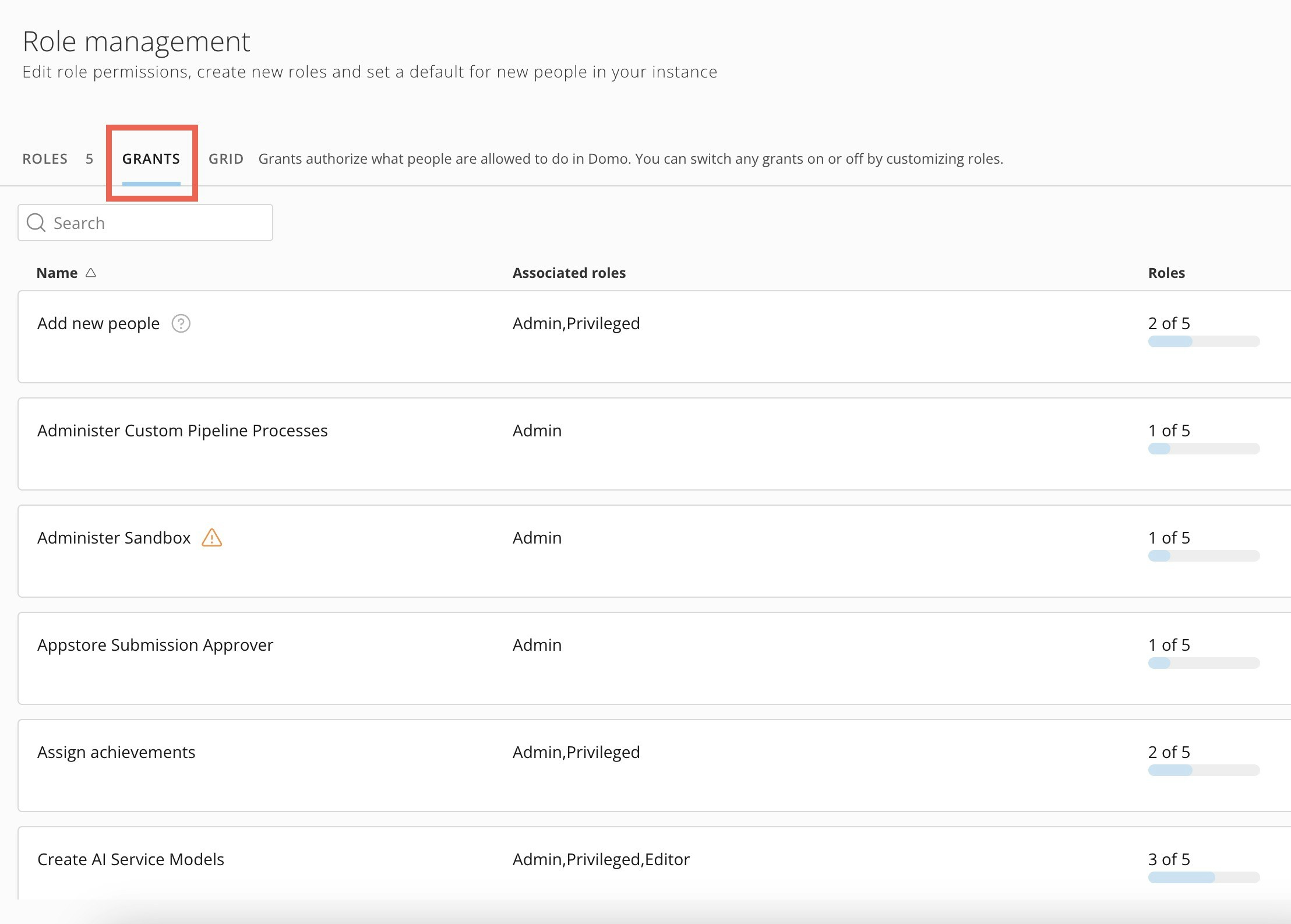
Go to the **Grants** tab to see all available grants.

<Warning>
  **Important:** Grants marked with a warning icon (<img src="https://mintlify.s3.us-west-1.amazonaws.com/domoinc/images/kb/ka0Vq000000Apaj-00N5w00000Ri7BU-0EMVq000005P0Rl.jpg" style={{width: 20, height: 20, display: 'inline', verticalAlign: 'start', margin: '0'}} /> ) are high-security grants that provide access to instance-wide controls.
</Warning>

<Frame>
  <img alt="" src="https://mintcdn.com/domoinc/GGpwPBfkHR_x3-yU/images/kb/ka0Vq000000Apaj-00N5w00000Ri7BU-0EMVq000005mBkf.jpg?fit=max&auto=format&n=GGpwPBfkHR_x3-yU&q=85&s=8ad60e23ec87aba3546d1ada09960b40" width="2216" height="1586" data-path="images/kb/ka0Vq000000Apaj-00N5w00000Ri7BU-0EMVq000005mBkf.jpg" />
</Frame>
