> ## Documentation Index
> Fetch the complete documentation index at: https://www.domo.com/docs/llms.txt
> Use this file to discover all available pages before exploring further.
# Setting Notifications in Workbench 5
You can configure Workbench to allow users to be notified via email when a DataSet job is completed, either successfully or unsuccessfully. You do this in the **Notifications** subtab for a given DataSet job. This lists all of the users on your Domo server with their roles and the email addresses to which notifications will be sent. For each user, **Notify on Success** and **Notify on Error** boxes are available. For any given user, you can select one box, both boxes, or leave both blank (in which case no notifications are sent).
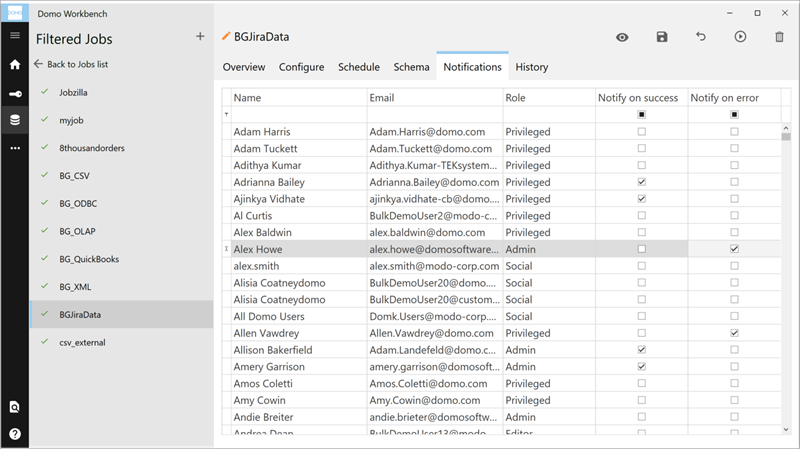 **To set notifications for a Workbench job,**
1. Click the
icon in the left-hand icon bar.
2. Open the job you want to set notifications for.
3. Click
**Notifications**.
4. Locate the user in the list you want to set notifications for.
5. Check the desired box(es).
6. Click "X" to close the dialog.
**To set notifications for a Workbench job,**
1. Click the
icon in the left-hand icon bar.
2. Open the job you want to set notifications for.
3. Click
**Notifications**.
4. Locate the user in the list you want to set notifications for.
5. Check the desired box(es).
6. Click "X" to close the dialog.