> ## Documentation Index
> Fetch the complete documentation index at: https://www.domo.com/docs/llms.txt
> Use this file to discover all available pages before exploring further.

# Understanding the CourseBuilder Layout

## Intro

This topic goes through all of the screens you'll encounter in CourseBuilder and points out the different elements present in each one.

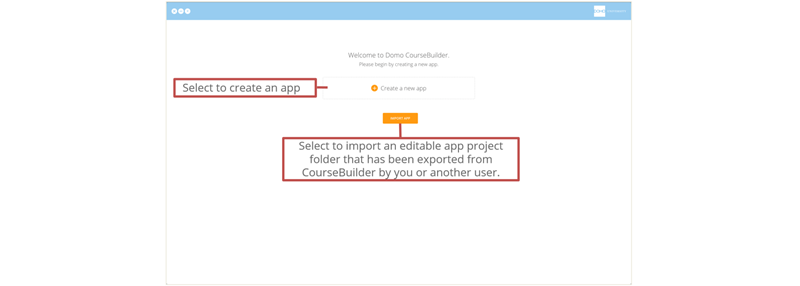
## Welcome Screen A

Before you create or import a CourseBuilder app or apps, the Welcome screen looks like this:
<Frame>
  <img alt="WelcomeSceenA.png" src="https://mintcdn.com/domoinc/Hi7ClIL2jsbnp4-K/images/kb/ka05w00000123g2-00N5w00000Ri7BU-0EM5w000005vOr1.png?fit=max&auto=format&n=Hi7ClIL2jsbnp4-K&q=85&s=f5dee4fb7adfbf2e6eab3afff50d66e0" width="800" height="286" data-path="images/kb/ka05w00000123g2-00N5w00000Ri7BU-0EM5w000005vOr1.png" />
</Frame>

## Welcome Screen B

After you have created or imported apps, the Welcome screen looks like this:

<Frame>
  <img alt="WelcomeSceenB.png" src="https://mintcdn.com/domoinc/Hi7ClIL2jsbnp4-K/images/kb/ka05w00000123g2-00N5w00000Ri7BU-0EM5w000005vOr0.png?fit=max&auto=format&n=Hi7ClIL2jsbnp4-K&q=85&s=324e68cda5a718d31e59d24b3bb19071" width="800" height="303" data-path="images/kb/ka05w00000123g2-00N5w00000Ri7BU-0EM5w000005vOr0.png" />
</Frame>

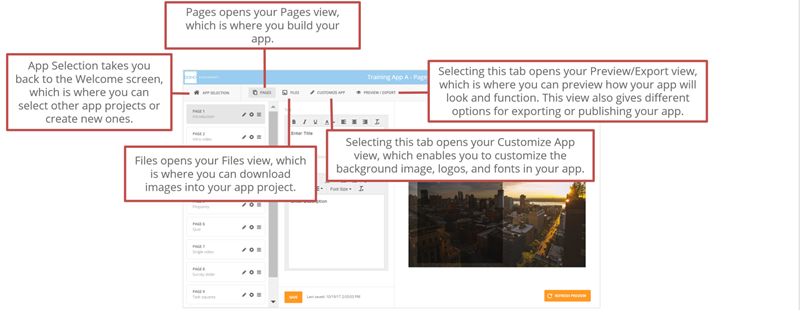
## CourseBuilder Menu

Once you create or open an app project, the following menu options appear along the top:
<Frame>
  <img alt="CourseBuilderMenu.png" src="https://mintcdn.com/domoinc/Hi7ClIL2jsbnp4-K/images/kb/ka05w00000123g2-00N5w00000Ri7BU-0EM5w000005vOqt.png?fit=max&auto=format&n=Hi7ClIL2jsbnp4-K&q=85&s=01c8d5ad4fd923b51e85564a911aafc6" width="800" height="310" data-path="images/kb/ka05w00000123g2-00N5w00000Ri7BU-0EM5w000005vOqt.png" />
</Frame>

## Files View

<Frame>
  <img alt="FilesView.png" src="https://mintcdn.com/domoinc/Hi7ClIL2jsbnp4-K/images/kb/ka05w00000123g2-00N5w00000Ri7BU-0EM5w000005vOqq.png?fit=max&auto=format&n=Hi7ClIL2jsbnp4-K&q=85&s=9f4d6fed63ca78e8e49fffec9deaa9dd" width="800" height="311" data-path="images/kb/ka05w00000123g2-00N5w00000Ri7BU-0EM5w000005vOqq.png" />
</Frame>

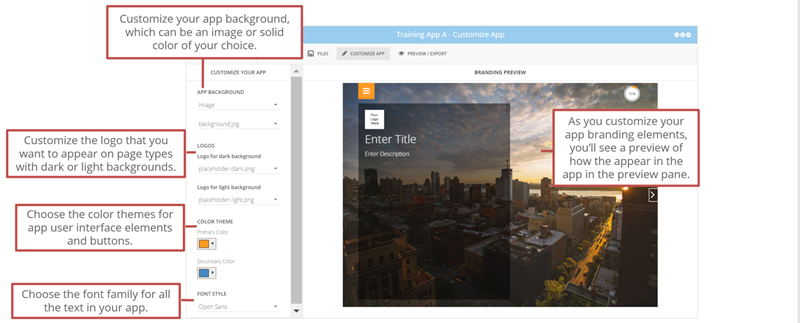
## Customize App View

<Frame>
  <img alt="CustomizeView.png" src="https://mintcdn.com/domoinc/Hi7ClIL2jsbnp4-K/images/kb/ka05w00000123g2-00N5w00000Ri7BU-0EM5w000005vOr2.png?fit=max&auto=format&n=Hi7ClIL2jsbnp4-K&q=85&s=a1fecc1f842a1350b43d3d131b8bce18" width="800" height="323" data-path="images/kb/ka05w00000123g2-00N5w00000Ri7BU-0EM5w000005vOr2.png" />
</Frame>

## Preview/Export View

<Frame>
  <img alt="Preview-ExportView.png" src="https://mintcdn.com/domoinc/Hi7ClIL2jsbnp4-K/images/kb/ka05w00000123g2-00N5w00000Ri7BU-0EM5w000005vOqs.png?fit=max&auto=format&n=Hi7ClIL2jsbnp4-K&q=85&s=f91ca39ee4b0302bfb21824d8016b66b" width="800" height="344" data-path="images/kb/ka05w00000123g2-00N5w00000Ri7BU-0EM5w000005vOqs.png" />
</Frame>