> ## Documentation Index
> Fetch the complete documentation index at: https://www.domo.com/docs/llms.txt
> Use this file to discover all available pages before exploring further.

# Sage Intacct Connector

<Warning>
  **Important:** Sage Intacct imposes a "concurrency limit" on API requests to
  their systems. Most customers are allowed 2 concurrent requests. However,
  depending on your service level agreement with Sage Intacct, you may have a
  greater concurrency limit. If you have a service level agreement that allows
  for a greater number of concurrent connections, you will need to go into your
  Domo account in the account center
  (https\://\[yourinstance].domo.com/datacenter/accounts) and update the value in
  your Sage Intacct account. Otherwise, Domo will simply default your account to
  the normal limit of 2 concurrent requests imposed by Sage Intacct. For more
  information, refer to the API documentation
  [https://developer.intacct.com/api/general-ledger/trial-balances/](https://developer.intacct.com/api/general-ledger/trial-balances/).
  This change will improve performance and help increase the stability of the
  Sage Intacct Connector. Overall, this should have very little impact on your
  DataSets, however, the downside of this change is that you may see an increase
  in the amount of time it takes to get your data into Domo if you do not update
  your account to reflect the appropriate limit. Additional steps can be taken
  to mitigate any potential slowdown by scheduling your Sage Intacct DataSets in
  such a way that they do not overlap each other.
</Warning>

## Intro

Sage Intacct helps you manage financials on your own terms with cloud-based accounting software. With Domo, stakeholders can visualize Sage Intacct data together with data from any other system in a real-time dashboard. That means fewer reports for finance and better insights all around.\
Once your data is in Domo, connect easily to your data and create powerful, dynamic visualizations. Get the up-to-date information you need to make smart decisions on cashflow, ledgers, accounts receivable, accounts payable, journals, P\&L, and more. Get real-time alerts via email and text when Sage Intacct metrics hit your predefined levels. Use Domo's Sage Intacct Connector to retrieve data relating to customers, accounts, invoices, payments, expenses, and the like. To learn more about the Sage Intacct API, visit their page ([https://developer.intacct.com/](https://developer.intacct.com/)).

You can connect to your Sage Intacct account in the Data Center. This topic discusses the fields and menus that are specific to the Sage Intacct Connector user interface. To add add DataSets, set update schedules, and edit DataSet information, see [Adding a DataSet Using a Connector](/docs/s/article/360042926274).

<Note>
  **Note:** The Sage Intacct Connector only imports standard reports. Within
  your Sage Intacct account you can create custom reports, set them to run on a
  schedule and have them delivered in a CSV format to a cloud storage service.
  Sage Intacct supports Dropbox, Box, Google Drive, and Amazon S3.Once delivered
  there customers can use the relevant Domo connector to import the custom
  report from the cloud storage service into Domo.
</Note>

|                                                           |                                                                                                          |
| --------------------------------------------------------- | -------------------------------------------------------------------------------------------------------- |
| **Primary Use Cases**                                     | This connector is appropriate for pulling financial reporting and accounting, sales, and inventory data. |
| **Primary Metrics**                                       | - Cashflow - Ledgers - Accounts receivable - Accounts payable - Journals - Profits and loss              |
| **Primary Company Roles**                                 | - CFO - Accountant - Sales - Inventory                                                                   |
| **Average Implementation Time**                           | Connector runtimes vary based on data, but generally it should take between 2 and 8 hours.               |
| **Ease of Use (on a 1-to-10 scale with 1 being easiest)** | 7                                                                                                        |

## Best Practices

Keep date ranges reasonable. If you only need the last quarter, do the last quarter; if you need the last three years, do all three years.

For Custom report, this Connector only supports 'current month' and 'current year' as the reporting period values. There might be a possibility of having other/additional supported values for Reporting Period. Contact Sage Intacct for other possible Reporting Duration values for filtering the data.

## Prerequisites

To connect to your Sage Intacct account and create a DataSet, you must have the following:

* The user ID for your Sage Intacct account. This is the same user ID you use to sign into the Sage Intacct cloud ERP software.
* The password for your Sage Intacct account. This is the same password you use to sign into the Sage Intacct cloud ERP software.
* Your Sage Intacct company ID. This ID is usually different for sandbox and production accounts. To locate the Company ID in Sage Intacct, hover over **Company** and click **Company Info**. **Company ID** is found in the **ID** field.
* (Optional) You can also provide a Location ID. This may help narrow your data request to a specific location. To locate the location ID in Sage Intacct, hover over **Company** and click **Locations**. Select a **Location ID** from the report.
* (Optional) Max Concurrent Connections. This is a number value for the maximum number of concurrent connections that Sage Intacct allows for your account. If you have increased your API rate limits with Sage Intacct, you can provide how many concurrent connections you are allowed here.
* Additionally, the Customer may need to add "Domo" as an **authorized sender ID** in their company configurations Security tab.

To obtain Sage Intacct Web Services credentials, contact your Sage Intacct account representative.

## Connecting to Your Sage Intacct Account

This section enumerates the options in the **Credentials** and **Details** panes in the Sage Intacct Connector page. The components of the other panes in this page, **Scheduling** and **Name & Describe Your DataSet**, are universal across most connector types and are discussed in great detail in [Adding a DataSet Using a Connector](/docs/s/article/360042926274).

### Credentials Pane

This pane contains fields for entering credentials to connect to your Sage Intacct account. The following table describes what is needed for each field:

| Field                      | Description                                                                                                                                                                                                                          |
| -------------------------- | ------------------------------------------------------------------------------------------------------------------------------------------------------------------------------------------------------------------------------------ |
| User ID                    | Enter your Intacct user ID. See "Prerequisites" for more details.                                                                                                                                                                    |
| Password                   | Enter your Intacct password. See "Prerequisites" for more details.                                                                                                                                                                   |
| Company ID                 | Enter your Intacct company ID. This ID is usually different for sandbox and production accounts.                                                                                                                                     |
| Location ID                | Enter your Intacct location ID. This may help you narrow your data request to a specific location.                                                                                                                                   |
| Max Concurrent Connections | Enter the number value for the maximum number of concurrent connections that Intacct allows for your account. If you have increased your API rate limits with Intacct, specify how many concurrent connections you are allowed here. |

Once you have entered valid Sage Intacct credentials, you can use the same account any time to create a new Sage Intacct DataSet. You can manage connector accounts in the **Accounts** tab in the Data Center. For more information about this tab, see [Manage Connector/Adapter Accounts](/docs/s/article/360042926054).

### Details Pane

This pane contains a primary **Reports** menu, along with various other menus which may or may not appear depending on the report type you select.

<table>
  <tbody>
    <tr>
      <td colspan="2">
        <b>Note:</b> There might be a possibility of having other/additional
        supported values for Reporting Period. Contact Sage Intacct for other
        possible Reporting Duration values for filtering the data.
      </td>
    </tr>

    <tr>
      <td colspan="1" rowspan="1">
        {" "}

        Report{" "}
      </td>

      <td colspan="1" rowspan="1">
        {" "}

        <table class="zebra-striped bordered">
          <tr>
            <th>Report</th>
            <th>Description</th>
          </tr>

          <tr>
            <td>Account Group</td>

            <td>
              Receives data about Intacct Account Group accounting reports.{" "}
            </td>
          </tr>

          <tr>
            <td>AP Account Label</td>

            <td>
              Receives data about Intacct Accounts Payable Account Label
              accounting reports.{" "}
            </td>
          </tr>

          <tr>
            <td>AP Adjustment</td>

            <td>
              Receives data about Intacct Accounts Payable Adjustment accounting
              reports. <strong>Date Filter</strong> is required for this
              report.{" "}
            </td>
          </tr>

          <tr>
            <td>AP Bill</td>

            <td>
              Receives data about Intacct Accounts Payable Bill accounting
              reports. <strong>Date Filter</strong> is required for this
              report.{" "}
            </td>
          </tr>

          <tr>
            <td>AP Bill Detail</td>

            <td>
              Receives data about Intacct Accounts Payable Bill Detail
              accounting reports.{" "}
            </td>
          </tr>

          <tr>
            <td>AP Payment</td>

            <td>
              Receives data about Intacct Accounts Payable Payment accounting
              reports. <strong>Date Filter</strong> is required for this
              report.{" "}
            </td>
          </tr>

          <tr>
            <td>AP Payment Request</td>

            <td>
              Receives data about Intacct Accounts Payable Payment Request
              accounting reports. <strong>Date Filter</strong> is required for
              this report.{" "}
            </td>
          </tr>

          <tr>
            <td>AP Term</td>

            <td>
              Receives data about Intacct Accounts Payable Term accounting
              reports.{" "}
            </td>
          </tr>

          <tr>
            <td>AR Account Label</td>

            <td>
              Receives data about Intacct Accounts Receivable Account Label
              accounting reports.{" "}
            </td>
          </tr>

          <tr>
            <td>AR Adjustment</td>

            <td>
              Receives data about Intacct Accounts Receivable Adjustment
              accounting reports. <strong>Date Filter</strong> is required for
              this report.{" "}
            </td>
          </tr>

          <tr>
            <td>AR Invoice</td>

            <td>
              Receives data about Intacct Accounts Receivable Invoice accounting
              reports. <strong>Date Filter</strong> is required for this
              report.{" "}
            </td>
          </tr>

          <tr>
            <td>AR Invoice Detail</td>

            <td>
              Receives data about Intacct Accounts Receivable Invoice Detail
              accounting reports.{" "}
            </td>
          </tr>

          <tr>
            <td>AR Payment</td>

            <td>
              Receives data about Intacct Accounts Receivable Payment accounting
              reports. <strong>Date Filter</strong> is required for this
              report.{" "}
            </td>
          </tr>

          <tr>
            <td>AR Payment Summary</td>

            <td>
              Receives data about Intacct Accounts Receivable Payment Summary
              accounting reports. <strong>Date Filter</strong> is required for
              this report.{" "}
            </td>
          </tr>

          <tr>
            <td>AR Term</td>

            <td>
              Receives data about Intacct Accounts Receivable Term accounting
              reports.{" "}
            </td>
          </tr>

          <tr>
            <td>AR Transaction Definition</td>

            <td>
              Receives data about Intacct Accounts Receivable Transaction
              Definition accounting reports.{" "}
            </td>
          </tr>

          <tr>
            <td>Bank Account</td>

            <td>
              Receives data about Intacct Bank Account accounting reports.{" "}
            </td>
          </tr>

          <tr>
            <td>Bill</td>

            <td>
              Receives data about Intacct Bill accounting reports.{" "}
              <strong>Date Filter</strong> is required for this report.{" "}
            </td>
          </tr>

          <tr>
            <td>Class</td>
            <td>Receives data about Intacct Class accounting reports. </td>
          </tr>

          <tr>
            <td>Company Information</td>

            <td>
              Receives data about Intacct Company Information accounting
              reports.{" "}
            </td>
          </tr>

          <tr>
            <td>Contact</td>
            <td>Receives data about Intacct Contact accounting reports. </td>
          </tr>

          <tr>
            <td>Contact Tax Group</td>

            <td>
              Receives data about Intacct Contact Tax Group accounting
              reports.{" "}
            </td>
          </tr>

          <tr>
            <td>CSN History</td>

            <td>
              Receives data about Intacct CSN History accounting reports.{" "}
            </td>
          </tr>

          <tr>
            <td>Cust GL Group</td>

            <td>
              Receives data about Intacct Cust General Group accounting
              reports.{" "}
            </td>
          </tr>

          <tr>
            <td>Customer</td>
            <td>Receives data about Intacct Customer accounting reports. </td>
          </tr>

          <tr>
            <td>Customer Ach Info</td>

            <td>
              Receives data about Intacct Customer Ach Info accounting
              reports.{" "}
            </td>
          </tr>

          <tr>
            <td>Customer Bank Account</td>

            <td>
              Receives data about Intacct Customer Bank Account accounting
              reports.{" "}
            </td>
          </tr>

          <tr>
            <td>Customer Charge Card (Deprecated)</td>

            <td>
              Receives data about Intacct Customer Charge Card accounting
              reports.{" "}
            </td>
          </tr>

          <tr>
            <td>Customer P Package</td>

            <td>
              Receives data about Intacct Customer P Package accounting
              reports.{" "}
            </td>
          </tr>

          <tr>
            <td>Custom Reports</td>
            <td>Receives data about Intacct Custom accounting reports.</td>
          </tr>

          <tr>
            <td>Department</td>
            <td>Receives data about Intacct Department accounting reports. </td>
          </tr>

          <tr>
            <td>Employee</td>
            <td>Receives data about Intacct Employee accounting reports. </td>
          </tr>

          <tr>
            <td>Expense Report</td>

            <td>
              Receives data about Intacct Expense Report accounting
              reports.{" "}
            </td>
          </tr>

          <tr>
            <td>Expense Report Summary</td>

            <td>
              Receives data about Intacct Expense Report Summary accounting
              reports.{" "}
            </td>
          </tr>

          <tr>
            <td>Expense Types</td>

            <td>
              Receives data about Intacct Expense Types accounting reports.{" "}
            </td>
          </tr>

          <tr>
            <td>GL Account</td>

            <td>
              Receives data about Intacct General Account accounting
              reports.{" "}
            </td>
          </tr>

          <tr>
            <td>GL Account Balance</td>

            <td>
              Receives data about Intacct General Account Balance accounting
              reports.{" "}
            </td>
          </tr>

          <tr>
            <td>GL Account Group</td>

            <td>
              Receives data about Intacct General Account Group accounting
              reports.{" "}
            </td>
          </tr>

          <tr>
            <td>GL Account Group Member</td>

            <td>
              Receives data about Intacct General Account Group Member
              accounting reports.{" "}
            </td>
          </tr>

          <tr>
            <td>GL Batch</td>

            <td>
              Receives data about Intacct General Batch accounting reports.{" "}
              <strong>Date Filter</strong> is required for this report.{" "}
            </td>
          </tr>

          <tr>
            <td>GL Budget</td>

            <td>
              Receives data about Intacct General Budget accounting
              reports.{" "}
            </td>
          </tr>

          <tr>
            <td>GL Budget Item</td>

            <td>
              Receives data about Intacct General Budget Item accounting
              reports.{" "}
            </td>
          </tr>

          <tr>
            <td>GL Account Category</td>

            <td>
              Receives data about Intacct General Account Category accounting
              reports.{" "}
            </td>
          </tr>

          <tr>
            <td>GL Entry</td>

            <td>
              Receives data about Intacct General Entry accounting reports.{" "}
              <strong>Date Filter</strong> is required for this report.{" "}
            </td>
          </tr>

          <tr>
            <td>GL Transaction</td>

            <td>
              Receives data about Intacct General Transaction accounting
              reports. <strong>Date Filter</strong> is required for this
              report.{" "}
            </td>
          </tr>

          <tr>
            <td>IC Item</td>

            <td>
              Receives data about Intacct Inventory Control Item accounting
              reports.{" "}
            </td>
          </tr>

          <tr>
            <td>IC Transaction</td>

            <td>
              Receives data about Intacct Inventory Control Transaction
              accounting reports. <strong>Date Filter</strong> is required for
              this report.{" "}
            </td>
          </tr>

          <tr>
            <td>IC Transaction Definition</td>

            <td>
              Receives data about Intacct Inventory Control Transaction
              Definition accounting reports.{" "}
            </td>
          </tr>

          <tr>
            <td>Invoice</td>

            <td>
              Receives data about Intacct Invoice accounting reports.{" "}
              <strong>Date Filter</strong> is required for this report.{" "}
            </td>
          </tr>

          <tr>
            <td>Item GL Group</td>

            <td>
              Receives data about Intacct Item General Group accounting
              reports.{" "}
            </td>
          </tr>

          <tr>
            <td>Item Tax Group</td>

            <td>
              Receives data about Intacct Item Tax Group accounting
              reports.{" "}
            </td>
          </tr>

          <tr>
            <td>Journal</td>
            <td>Receives data about Intacct Journal accounting reports. </td>
          </tr>

          <tr>
            <td>Location</td>
            <td>Receives data about Intacct Location accounting reports. </td>
          </tr>

          <tr>
            <td>Location Entity</td>

            <td>
              Receives data about Intacct Location Entity accounting
              reports.{" "}
            </td>
          </tr>

          <tr>
            <td>Location Group</td>

            <td>
              Receives data about Intacct Location Group accounting
              reports.{" "}
            </td>
          </tr>

          <tr>
            <td>PO Price List</td>

            <td>
              Receives data about Intacct Purchase Order Price List accounting
              reports.{" "}
            </td>
          </tr>

          <tr>
            <td>PO Transaction</td>

            <td>
              Receives data about Intacct Purchase Order Transaction accounting
              reports. <strong>Date Filter</strong> is required for this
              report.{" "}
            </td>
          </tr>

          <tr>
            <td>PO Transaction Definition</td>

            <td>
              Receives data about Intacct Purchase Order Transaction Definition
              accounting reports.{" "}
            </td>
          </tr>

          <tr>
            <td>Pricelist Item</td>

            <td>
              Receives data about Intacct Pricelist Item accounting
              reports.{" "}
            </td>
          </tr>

          <tr>
            <td>Product Line</td>

            <td>
              Receives data about Intacct Product Line accounting reports.{" "}
            </td>
          </tr>

          <tr>
            <td>Project</td>
            <td>Receives data about Intacct Project accounting reports. </td>
          </tr>

          <tr>
            <td>Renewal Macro</td>

            <td>
              Receives data about Intacct Renewal Macro accounting reports.{" "}
            </td>
          </tr>

          <tr>
            <td>Reporting Period</td>

            <td>
              Receives data about Intacct Reporting Period accounting
              reports.{" "}
            </td>
          </tr>

          <tr>
            <td>Revenue Recognition Schedule</td>

            <td>
              Receives data about Intacct Revenue Recognition Schedule
              accounting reports.{" "}
            </td>
          </tr>

          <tr>
            <td>Revenue Recognition Schedule Entry</td>

            <td>
              Receives data about Intacct Revenue Recognition Schedule Entry
              accounting reports.{" "}
            </td>
          </tr>

          <tr>
            <td>Revenue Recognition Template</td>

            <td>
              Receives data about Intacct Revenue Recognition Schedule Template
              accounting reports.{" "}
            </td>
          </tr>

          <tr>
            <td>Sales Document</td>
            <td>Receives data about Intacct Sales Document reports. </td>
          </tr>

          <tr>
            <td>Sales Document Detail</td>
            <td>Receives data about Intacct Sales Document Detail reports. </td>
          </tr>

          <tr>
            <td>Sales Document Subtotals</td>

            <td>
              Receives data about Intacct Sales Document Subtotal reports.{" "}
            </td>
          </tr>

          <tr>
            <td>Smart Event Log</td>

            <td>
              Receives data about Intacct Smart Event Log reports.{" "}
              <strong>Date Filter</strong> is required for this report.{" "}
            </td>
          </tr>

          <tr>
            <td>SO Price List</td>

            <td>
              Receives data about Intacct Sales Order Price List accounting
              reports.{" "}
            </td>
          </tr>

          <tr>
            <td>SO Transaction</td>

            <td>
              Receives data about Intacct Sales Order Transaction accounting
              reports. <strong>Date Filter</strong> is required for this
              report.{" "}
            </td>
          </tr>

          <tr>
            <td>SO Transaction Definition</td>

            <td>
              Receives data about Intacct Sales Order Transaction Definition
              accounting reports.{" "}
            </td>
          </tr>

          <tr>
            <td>SO Transaction Detail</td>

            <td>
              Receives data about Intacct Sales Order Transaction Detail
              accounting reports.{" "}
            </td>
          </tr>

          <tr>
            <td>Stat GL Account</td>

            <td>
              Receives data about Intacct Stat General Ledger Account accounting
              reports.{" "}
            </td>
          </tr>

          <tr>
            <td>Statistical Journal</td>

            <td>
              Receives data about Intacct Statistical Journal accounting
              reports.{" "}
            </td>
          </tr>

          <tr>
            <td>ST Kit Transaction</td>

            <td>
              Receives data about Intacct Kit Transaction accounting reports.{" "}
              <strong>Date Filter</strong> is required for this report.{" "}
            </td>
          </tr>

          <tr>
            <td>Subscription</td>

            <td>
              Receives data about Intacct Subscription accounting reports.{" "}
            </td>
          </tr>

          <tr>
            <td>Tax Detail</td>
            <td>Receives data about Intacct Tax Detail accounting reports. </td>
          </tr>

          <tr>
            <td>Tax Schedule</td>

            <td>
              Receives data about Intacct Tax Schedule accounting reports.{" "}
            </td>
          </tr>

          <tr>
            <td>Tax Schedule Detail</td>

            <td>
              Receives data about Intacct Tax Schedule Detail accounting
              reports.{" "}
            </td>
          </tr>

          <tr>
            <td>Tax Schedule Map</td>

            <td>
              Receives data about Intacct Tax Schedule Map accounting
              reports.{" "}
            </td>
          </tr>

          <tr>
            <td>Territory</td>
            <td>Receives data about Intacct Territory accounting reports. </td>
          </tr>

          <tr>
            <td>Transaction Currency</td>

            <td>
              Receives data about Intacct Transaction Currency accounting
              reports. <strong>Date Filter</strong> is required for this
              report.{" "}
            </td>
          </tr>

          <tr>
            <td>Unit of Measure</td>

            <td>
              Receives data about Intacct Unit of Measure accounting
              reports.{" "}
            </td>
          </tr>

          <tr>
            <td>Vendor GL Group</td>

            <td>
              Receives data about Intacct Vendor General Group accounting
              reports.{" "}
            </td>
          </tr>

          <tr>
            <td>Vendor</td>

            <td>
              Receives data about Intacct Vendor accounting reports.{" "}
              <strong>Date Filter</strong> is required for this report.{" "}
            </td>
          </tr>

          <tr>
            <td>VSOE Item Pricelist</td>

            <td>
              Receives data about Intacct Vendor-Specific Objective Evidence
              Item Pricelist accounting reports.{" "}
            </td>
          </tr>

          <tr>
            <td>VSOE Pricelist</td>

            <td>
              Receives data about Intacct Vendor-Specific Objective Evidence
              Pricelist accounting reports.{" "}
            </td>
          </tr>

          <tr>
            <td>Warehouse</td>
            <td>Receives data about Intacct Warehouse accounting reports. </td>
          </tr>
        </table>

        {" "}
      </td>
    </tr>

    <tr>
      <td colspan="1" rowspan="1">
        {" "}

        Reporting Period{" "}
      </td>

      <td colspan="1" rowspan="1">
        {" "}

        Select a reporting period name, if applicable.{" "}
      </td>
    </tr>

    <tr>
      <td colspan="1" rowspan="1">
        {" "}

        Number of Months Back{" "}
      </td>

      <td colspan="1" rowspan="1">
        {" "}

        Enter the number of months of historical data to retrieve.{" "}
      </td>
    </tr>

    <tr>
      <td colspan="1" rowspan="1">
        {" "}

        Date Filter{" "}
      </td>

      <td colspan="1" rowspan="1">
        {" "}

        Select whether you want to filter results by the date of creation or the
        date when they were last modified.{" "}
      </td>
    </tr>

    <tr>
      <td colspan="1" rowspan="1">
        {" "}

        Page Size{" "}
      </td>

      <td colspan="1" rowspan="1">
        <span>
          {" "}

          Select the page size. It must be between 10 and 250. The page size
          number limits how much data is consumed from the API at once. If you
          are receiving an error, try decreasing the page size.{" "}
        </span>
      </td>
    </tr>

    <tr>
      <td colspan="1" rowspan="1">
        {" "}

        Custom Report Name{" "}
      </td>

      <td colspan="1" rowspan="1">
        <span> Enter the custom report name. </span>
      </td>
    </tr>

    <tr>
      <td colspan="1" rowspan="1">
        {" "}

        Filter Data{" "}
      </td>

      <td colspan="1" rowspan="1">
        <span>
          {" "}

          Select this checkbox if you'd like to filter your custom report by
          date. If your report supports date filtering, you'll be able to select
          options to set the date range.{" "}
        </span>
      </td>
    </tr>

    <tr>
      <td colspan="1" rowspan="1">
        {" "}

        Filter Arguments{" "}
      </td>

      <td colspan="1" rowspan="1">
        <span>
          {" "}

          Filter Arguments give you options to filter the custom report by a
          specific or relative date range, or by a reporting period such as
          'Current Month' or 'Current Year'. If your custom report does not
          support date filters, this drop down will be empty.{" "}
        </span>
      </td>
    </tr>

    <tr>
      <td colspan="1" rowspan="1">
        {" "}

        Module Key{" "}
      </td>

      <td colspan="1" rowspan="1">
        <span> Select a module key. </span>
      </td>
    </tr>

    <tr>
      <td colspan="1" rowspan="1">
        {" "}

        Date{" "}
      </td>

      <td colspan="1" rowspan="1">
        <p>
          {" "}

          Specify whether the report's data is for a single date or a range of
          dates.{" "}
        </p>

        <ul>
          <li>
            <b> Single date </b>: Choose a specific day for which you would like
            to receive the data by entering a number relative to today. For
            example, enter 0 for today, 1 for yesterday, or 7 for 7 days
            ago.{" "}
          </li>

          <li>
            <b> Date range: </b> When you select the date range option, the
            option to select the custom start and end dates appears.{" "}

            <ul>
              <li>
                <b> Start Date </b>: Select the start date for your report. You
                can either select a specific start date or a relative start
                date.{" "}
              </li>

              <li>
                <b> End Date </b>: Select the end date for your report. You can
                either select a specific end date or a relative end date.{" "}
              </li>
            </ul>
          </li>
        </ul>
      </td>
    </tr>

    <tr>
      <td colspan="1" rowspan="1">
        {" "}

        Start Date - Relative - <b> Days Back </b>
      </td>

      <td colspan="1" rowspan="1">
        <span>
          {" "}

          Choose the day for which you would like to start receiving the data by
          entering a number relative to today. For example, enter 1 for
          yesterday, 7 for 1 week ago, and 30 for 1 month ago.{" "}
        </span>
      </td>
    </tr>

    <tr>
      <td colspan="1" rowspan="1">
        {" "}

        End Date - Relative - <b> Days Back </b>
      </td>

      <td colspan="1" rowspan="1">
        <span>
          {" "}

          Choose the day for which you would like to stop receiving data by
          entering a number relative to today. For example, enter 1 for
          yesterday, 7 for 1 week ago, and 30 for 1 month ago.{" "}
        </span>
      </td>
    </tr>

    <tr>
      <td colspan="1" rowspan="1">
        {" "}

        Single date - Relative - <b> Days Back </b>
      </td>

      <td colspan="1" rowspan="1">
        <span>
          {" "}

          Specify the number of days before today for which you would like to
          receive the data. For example, enter 0 for today or 7 for seven days
          ago.{" "}
        </span>
      </td>
    </tr>

    <tr>
      <td colspan="1" rowspan="1">
        {" "}

        Reporting Period Name
      </td>

      <td colspan="1" rowspan="1">
        <span> Select a reporting period name (optional). </span>
      </td>
    </tr>

    <tr>
      <td colspan="1" rowspan="1">
        {" "}

        Show starting and ending balance debits and credits
      </td>

      <td colspan="1" rowspan="1">
        <span>
          {" "}

          Show beginning and ending balance debits and credits. Set to True to
          include these values in the results.{" "}
        </span>
      </td>
    </tr>

    <tr>
      <td colspan="1" rowspan="1">
        {" "}

        Show zero balance accounts
      </td>

      <td colspan="1" rowspan="1">
        <span>
          {" "}

          Set to True to include accounts with a zero balance in the
          results.{" "}
        </span>
      </td>
    </tr>

    <tr>
      <td colspan="1" rowspan="1">
        {" "}

        Expand department detail
      </td>

      <td colspan="1" rowspan="1">
        <span>
          {" "}

          Set to True to include expanded department details in the
          results.{" "}
        </span>
      </td>
    </tr>

    <tr>
      <td colspan="1" rowspan="1">
        {" "}

        Expand location detail
      </td>

      <td colspan="1" rowspan="1">
        <span>
          {" "}

          Set to True to include expanded location details in the results.{" "}
        </span>
      </td>
    </tr>

    <tr>
      <td colspan="1" rowspan="1">
        {" "}

        Reporting book ID
      </td>

      <td colspan="1" rowspan="1">
        <span>
          {" "}

          Enter the reporting book ID. Use ACCRUAL or CASH, depending on your
          company configuration.{" "}
        </span>
      </td>
    </tr>

    <tr>
      <td colspan="1" rowspan="1">
        {" "}

        Date Type
      </td>

      <td colspan="1" rowspan="1">
        <span>
          <p>Select the date type to use for filtering:</p>

          <ul>
            <li>
              <strong>Created Date</strong> filters records based on when the
              item was created.
            </li>

            <li>
              <strong>Modified Date</strong> filters records based on when the
              item was last modified.
            </li>

            <li>
              <strong>Batch Date</strong> filters records based on the item's
              batch date.
            </li>
          </ul>
        </span>
      </td>
    </tr>

    <tr>
      <td colspan="1" rowspan="1">
        {" "}

        Reset Schema
      </td>

      <td colspan="1" rowspan="1">
        <p>Select whether to refresh the schema.</p>

        <p>
          <strong>Warning:</strong> Refreshing the schema can result in data
          loss or changes to column data types based on the data returned by the
          Intacct API.
        </p>

        <p>
          We recommend selecting <strong>Refresh Schema</strong> only when
          necessary, and then switching back to <strong>Keep Schema</strong>{" "}
          after the schema update is complete.
        </p>
      </td>
    </tr>

    <tr>
      <td colspan="1" rowspan="1">
        {" "}

        Batch Size (rows per page)
      </td>

      <td colspan="1" rowspan="1">
        <span>
          Specify the number of rows to retrieve per API call (1-1000). The
          default value is 1000. If you experience connection-related extraction
          failures, reduce this value. Smaller batch sizes can improve
          reliability but may increase processing time.{" "}
        </span>
      </td>
    </tr>
  </tbody>
</table>

### Other Panes

For information about the remaining sections of the connector interface, including how to configure scheduling, retry, and update options, see [Adding a DataSet Using a Connector](/docs/s/article/360042926274).

## Troubleshooting

* The biggest pitfall with this connector is credentials. Often, the username or password is wrong and the connector will fail. See Prerequisites to get the right information.
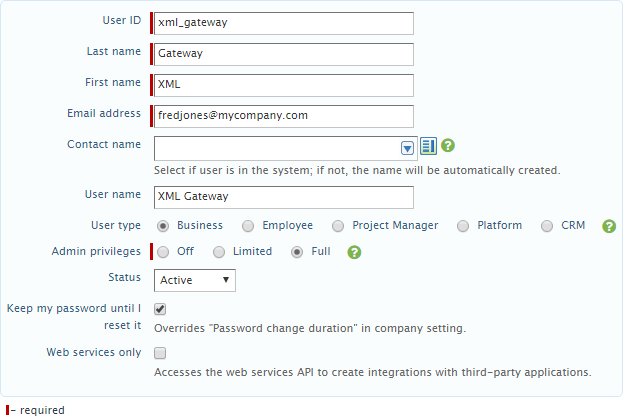
* If you cannot authenticate, even with correct credentials, you may need to enable the XML Gateway API for your company. To do this, follow these instructions:
  1. Log into Sage Intacct.

  2. Mouse over the **Company** tab.

  3. Click the plus button next to **Users.**

  4. Fill in the fields as follows:
     * **User ID**: Enter xml\_gateway.
     * **Last Name:** Enter Gateway.
     * **First Name:** Enter XML.
     * **Email address:** Enter your own email address.
     * **User Type**: Select **Business**.
     * **Admin Privileges**: Select **Full**.

  5. Check the box that reads "Keep my password until I reset it."

     <Frame>
       <img alt="" src="https://mintcdn.com/domoinc/Rw39NdLVKytW8WJs/images/kb/ka0Vq000000GcsX-00N5w00000Ri7BU-0EM5w000005vO1i.png?fit=max&auto=format&n=Rw39NdLVKytW8WJs&q=85&s=a952cd4ceba63e6af5e733ccfcf01266" width="623" height="416" data-path="images/kb/ka0Vq000000GcsX-00N5w00000Ri7BU-0EM5w000005vO1i.png" />
     </Frame>

  6. Do one of the following:
     * If you use roles...
       1. Open the **Roles Information** tab.
       2. Click in row 1 to show a dropdown menu.
       3. Select the role that should have full access in your system (most likely **Admin**).

     * If you are not using roles...
       1. Save your changes.
       2. Give the user the proper subscriptions.

  7. Click **Save**.
     This sets up the user. Sage Intacct now sends an email with a temporary password to the email address you specified. You should now be able to use this user to log into the Connector interface in Domo.