> ## Documentation Index
> Fetch the complete documentation index at: https://www.domo.com/docs/llms.txt
> Use this file to discover all available pages before exploring further.
# Restrict Access to a SQL DataFlow
## Intro
When you need to share a SQL DataFlow with your team or others, but want to restrict *edit* access to the DataFlow owner and Domo admins, you can choose to make the DataFlow "private" while creating or editing it.
**Note:** Admins are those with an Admin system role or a custom role with the Manage DataFlow grant enabled. Learn more about [managing roles and grants](/docs/s/article/360043438973).
***
## Restrict Edit Access to a SQL DataFlow
Follow these steps to restrict edit access to a DataFlow:
1. While creating or editing the DataFlow, select **Settings** to open the settings modal.
 2. Go to the modal's **Privacy** tab and check the box labeled **Enable Privacy**.
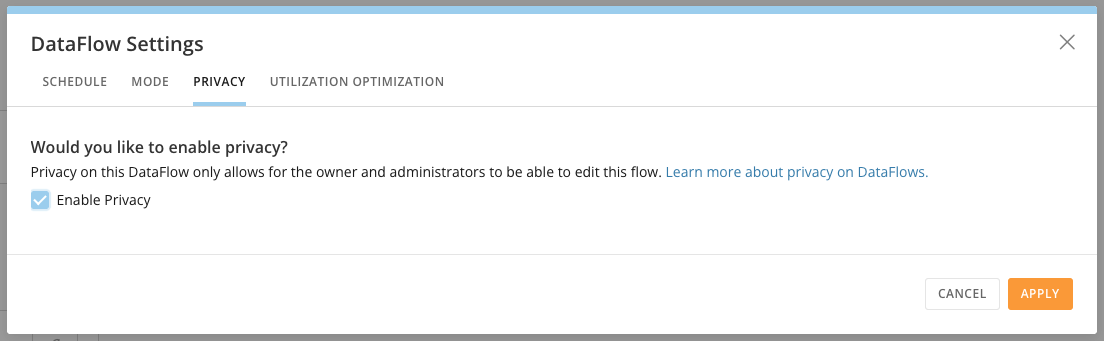 3. Select **Apply** to close the modal
4. Save the changes to your DataFlow.
**Note:** To enable edit access to all viewers of this DataFlow, follow these steps and uncheck the box.
## Restrictions on Sharing DataFlows
You may want to share a DataFlow with another person so that they can access and edit that DataFlow. In this case, the following must be true:
* The person must have access to all input DataSets for the DataFlow
* The person cannot be a part of a Personalized Data Permissions (PDP) policy on any of the input OR output DataSets that restricts data.
Either the DataSet(s) must have PDP disabled OR the person must be a member of the All Rows policy for the DataSet(s).
3. Select **Apply** to close the modal
4. Save the changes to your DataFlow.
**Note:** To enable edit access to all viewers of this DataFlow, follow these steps and uncheck the box.
## Restrictions on Sharing DataFlows
You may want to share a DataFlow with another person so that they can access and edit that DataFlow. In this case, the following must be true:
* The person must have access to all input DataSets for the DataFlow
* The person cannot be a part of a Personalized Data Permissions (PDP) policy on any of the input OR output DataSets that restricts data.
Either the DataSet(s) must have PDP disabled OR the person must be a member of the All Rows policy for the DataSet(s).
Learn more about [PDP](/docs/s/article/360042934614).