> ## Documentation Index
> Fetch the complete documentation index at: https://www.domo.com/docs/llms.txt
> Use this file to discover all available pages before exploring further.
# 2024 Release 6 | November
## New Features and Enhancements
### Advanced Scheduling for Data Freshness
Advanced Scheduling gives you more control over when your data is queried for updates, allowing you to check only when necessary. This can reduce expenses related to overall data freshness.
 Learn more about data freshness in the [Cloud Amplifier Overview](/s/article/4412849158167).
### Workflows Data Query and AI Assist
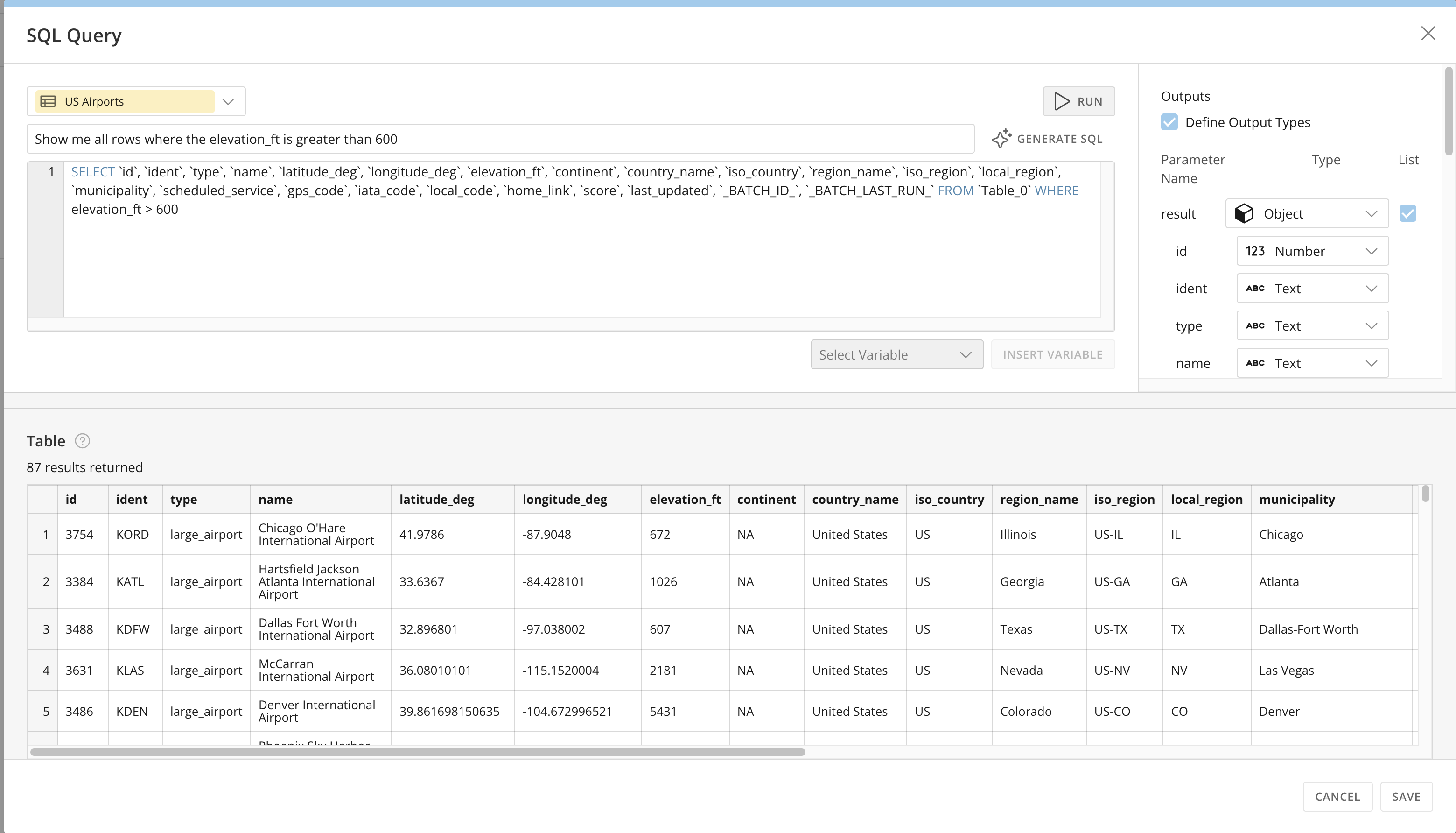
The new "Text to SQL" AI feature makes it even easier to create queries using the DataSet Query Task in Workflows. You can enter your query using plain text and receive an AI-generated SQL statement to use in your workflow.
Learn more about the [DataSet Query Task](/s/article/000005331#add-a-variable) in Workflows.
Learn more about data freshness in the [Cloud Amplifier Overview](/s/article/4412849158167).
### Workflows Data Query and AI Assist
The new "Text to SQL" AI feature makes it even easier to create queries using the DataSet Query Task in Workflows. You can enter your query using plain text and receive an AI-generated SQL statement to use in your workflow.
Learn more about the [DataSet Query Task](/s/article/000005331#add-a-variable) in Workflows.
 ### Domo Mobile App Customization
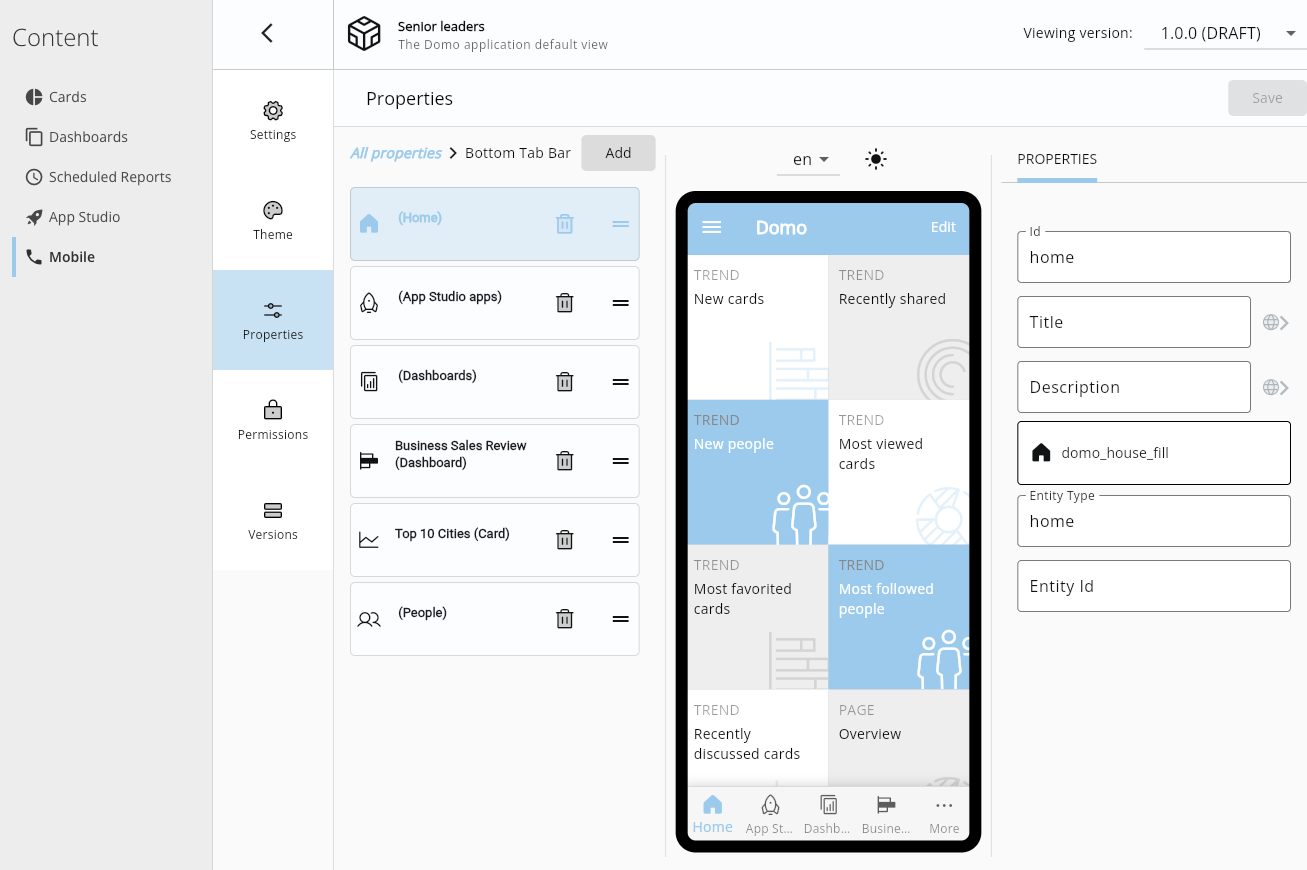
You can now customize your Domo mobile app navigation, enabling you to quickly access important apps and metrics for daily review.
[Learn how](https://domo-support.domo.com/s/article/000005648?language=en_US) in the Knowledge Base.
### Domo Mobile App Customization
You can now customize your Domo mobile app navigation, enabling you to quickly access important apps and metrics for daily review.
[Learn how](https://domo-support.domo.com/s/article/000005648?language=en_US) in the Knowledge Base.
 ### DomoStats: Group Members Report
 The new DomoStats: Group Members report allows you to see a listing of groups and their members.
With this report, Domo Admins can track group membership and gather further insight by combining the Group Members report with others such as the People, Card Permissions, and DataSet Access reports.
A new DomoStats report, Groups, is being released for beta. Learn about it [below](#domostats-groups-report).
Learn more about [DomoStats](/s/article/360043433813).
### Export Options for App Studio Embed
Export options are now available in App Studio Embed. Using this functionality, you can export your cards in Embed as CSV, PowerPoint, Excel files or to print.
Learn about [App Studio Embed](/s/article/000005295#export-embedded-app-content).
The new DomoStats: Group Members report allows you to see a listing of groups and their members.
With this report, Domo Admins can track group membership and gather further insight by combining the Group Members report with others such as the People, Card Permissions, and DataSet Access reports.
A new DomoStats report, Groups, is being released for beta. Learn about it [below](#domostats-groups-report).
Learn more about [DomoStats](/s/article/360043433813).
### Export Options for App Studio Embed
Export options are now available in App Studio Embed. Using this functionality, you can export your cards in Embed as CSV, PowerPoint, Excel files or to print.
Learn about [App Studio Embed](/s/article/000005295#export-embedded-app-content).
 ### Analyzer Updates
#### Image and Link Table Column Types
The new Image and Link table column types allow you to display an image or link in a column without concatenating HTML elements.
Learn more about [table charts](/s/article/360043429573).
### Analyzer Updates
#### Image and Link Table Column Types
The new Image and Link table column types allow you to display an image or link in a column without concatenating HTML elements.
Learn more about [table charts](/s/article/360043429573).
 #### Image Chart
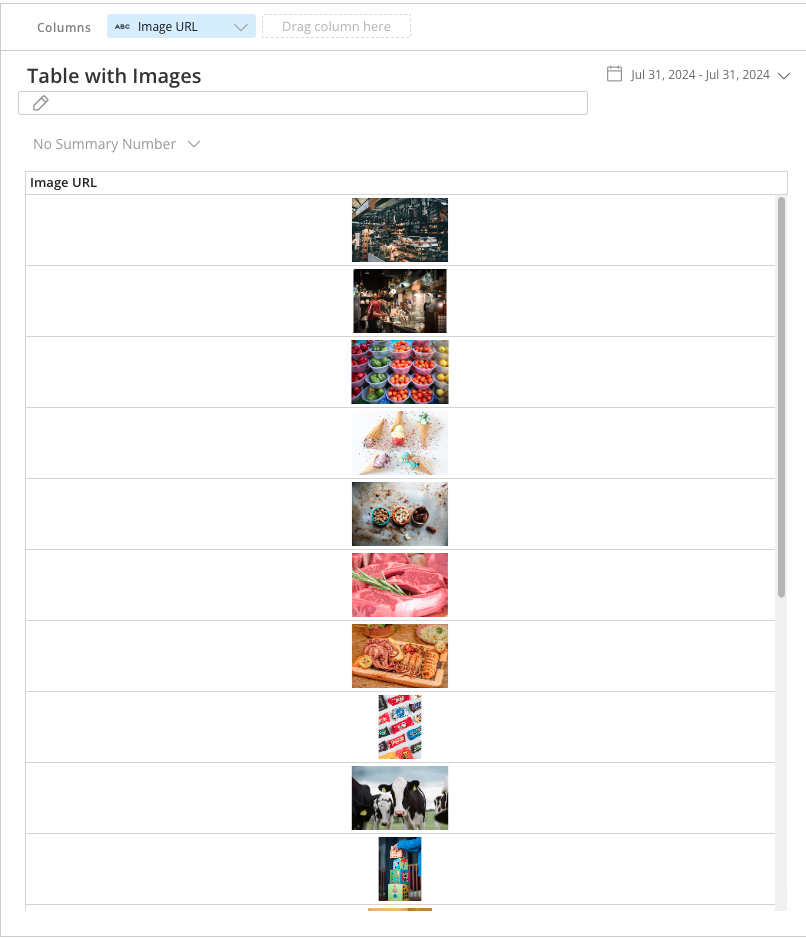
With the new Image Chart in Analyzer, you can add an image URL column to your chart. This allows you to dynamically display images based on the data shown on the app page or dashboard. Image charts are responsive to filters.
Learn about the [Image Chart](/s/article/000005654) in the Knowledge Base.
#### Image Chart
With the new Image Chart in Analyzer, you can add an image URL column to your chart. This allows you to dynamically display images based on the data shown on the app page or dashboard. Image charts are responsive to filters.
Learn about the [Image Chart](/s/article/000005654) in the Knowledge Base.
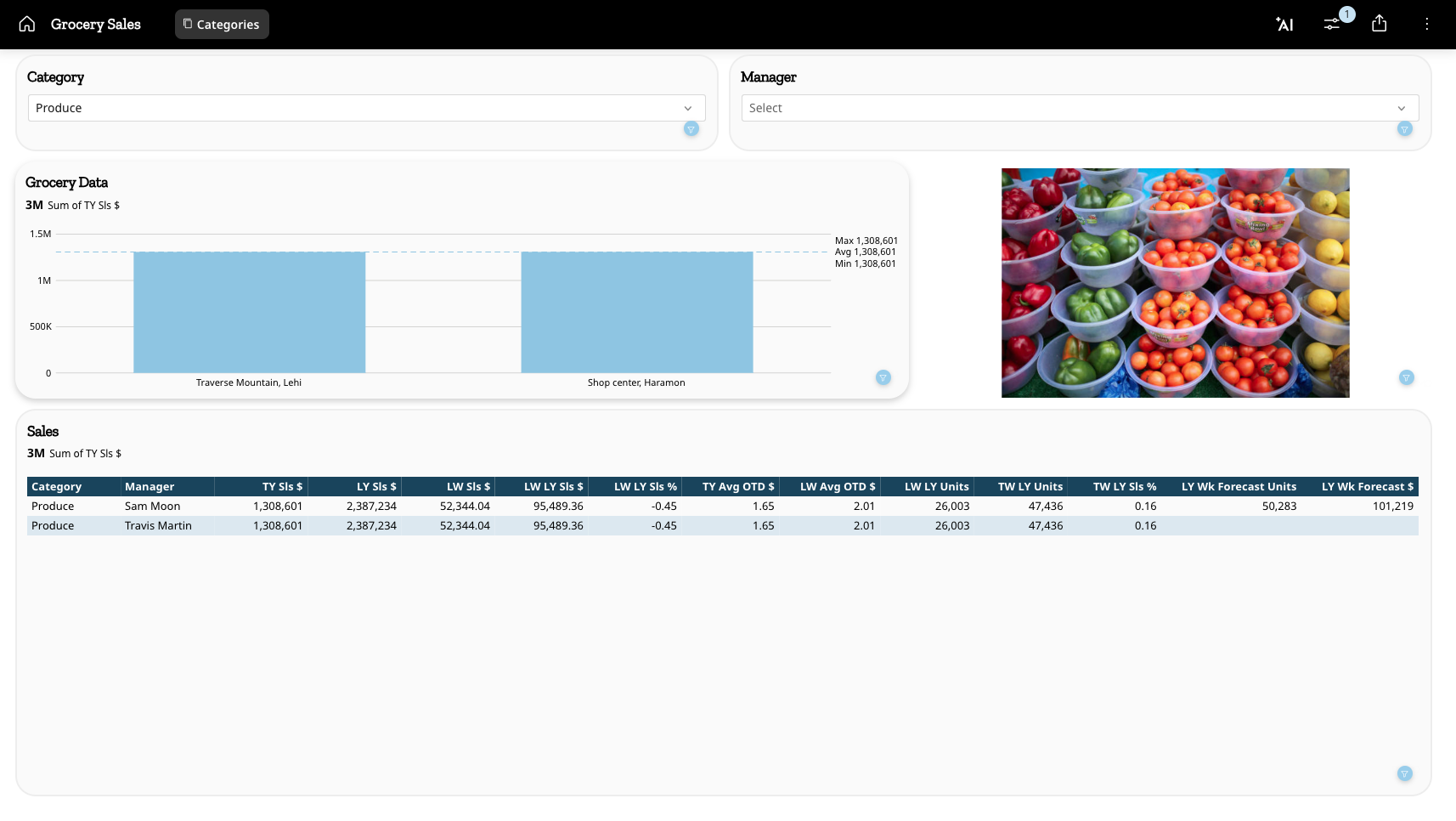 ### Pro-code Editor
The Pro-code Editor is now available for everyone to use in Domo.
The Pro-code Editor allows you to develop pro-code apps in a web IDE. Write and preview code in the familiar Domo interface and access other Domo-specific tools that support fluid development.
### Pro-code Editor
The Pro-code Editor is now available for everyone to use in Domo.
The Pro-code Editor allows you to develop pro-code apps in a web IDE. Write and preview code in the familiar Domo interface and access other Domo-specific tools that support fluid development.
 Learn more about the [Pro-code Editor](https://domo-support.domo.com/s/article/000005500?language=en_US).
### IP Address Allowlist
We've added tooltips and a new user interface to improve your experience when adding/removing IP addresses from the allowlist. The allowlist can help you manage who can access Domo and from where.
Learn more about the [Pro-code Editor](https://domo-support.domo.com/s/article/000005500?language=en_US).
### IP Address Allowlist
We've added tooltips and a new user interface to improve your experience when adding/removing IP addresses from the allowlist. The allowlist can help you manage who can access Domo and from where.
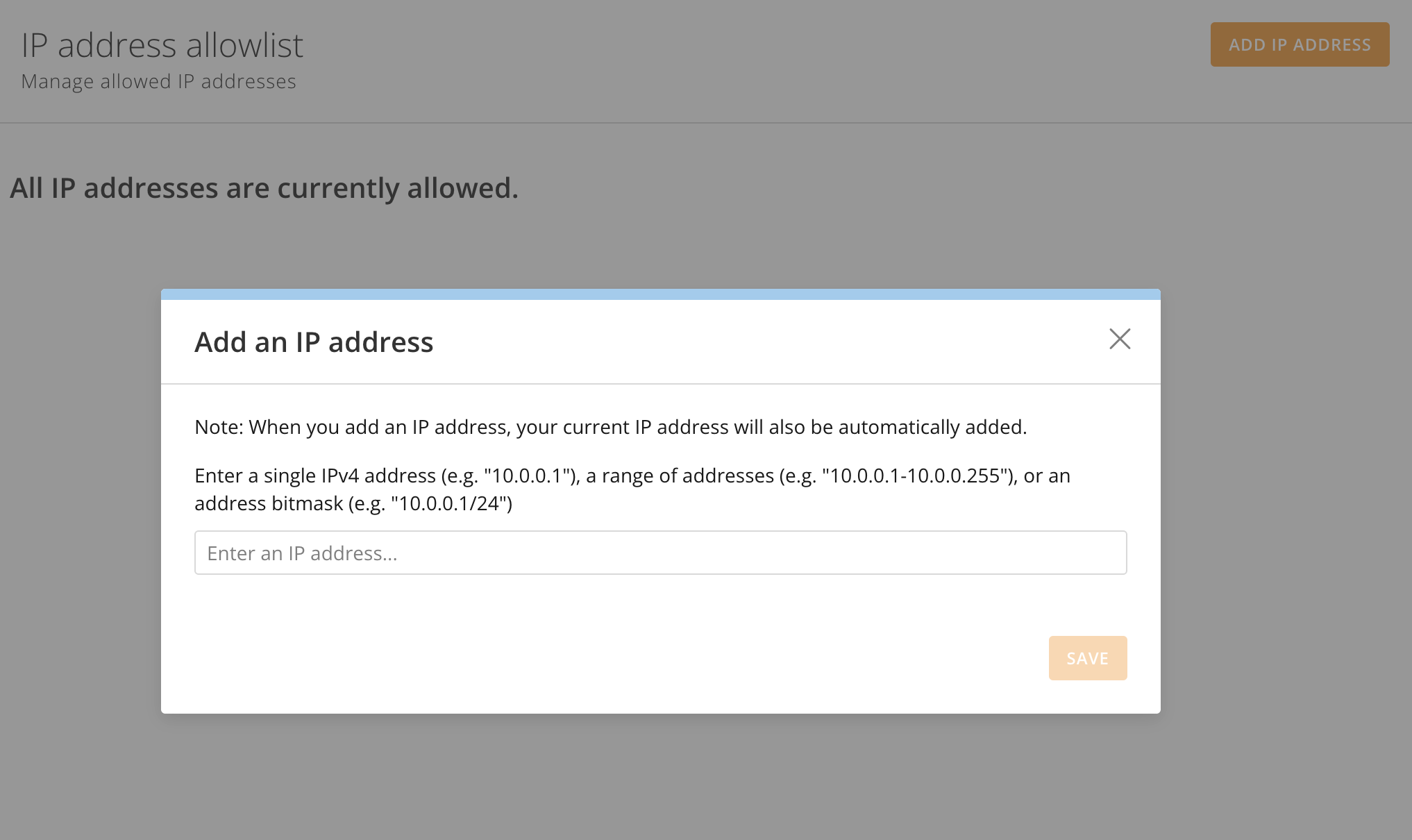 Learn how to [use the IP Address Allowlist](/s/article/360043439173).
### "ON" Property in Join Data Tile in Magic ETL
The new ON property in the Join Data tile allows you to write your own freeform ON clause for joins. This allows you to write complex joins, including non-equijoins and ranged joins.
Learn how to [use the IP Address Allowlist](/s/article/360043439173).
### "ON" Property in Join Data Tile in Magic ETL
The new ON property in the Join Data tile allows you to write your own freeform ON clause for joins. This allows you to write complex joins, including non-equijoins and ranged joins.
 Learn more about the [Join Data tile](/s/article/360044876194#join-data-tile) and [Magic ETL](https://domo-support.domo.com/s/topic/0TO5w000000ZanvGAC/magic-etl?language=en_US) in the Knowledge Base.
***
## Beta Features
*To join a beta, contact your Domo account team. If you do not have contact information for your account team, you can email Domo Support at [support@domo.com](mailto:support@domo.com). You may be required to complete training before you can use the feature.*
### Activity Log Updates
We have converted the Activity Log to React. The following improvements come with this update:
* More intuitive event filtering with Event Type and Event broken out into separate dropdown filters.
* Date and Person filtering are now built into the column header rather than being separated into dropdown filter elements.
* A more compact user experience, making better use of space.
See [Activity Log](/s/article/360042934574) in the Knowledge Base.
Learn more about the [Join Data tile](/s/article/360044876194#join-data-tile) and [Magic ETL](https://domo-support.domo.com/s/topic/0TO5w000000ZanvGAC/magic-etl?language=en_US) in the Knowledge Base.
***
## Beta Features
*To join a beta, contact your Domo account team. If you do not have contact information for your account team, you can email Domo Support at [support@domo.com](mailto:support@domo.com). You may be required to complete training before you can use the feature.*
### Activity Log Updates
We have converted the Activity Log to React. The following improvements come with this update:
* More intuitive event filtering with Event Type and Event broken out into separate dropdown filters.
* Date and Person filtering are now built into the column header rather than being separated into dropdown filter elements.
* A more compact user experience, making better use of space.
See [Activity Log](/s/article/360042934574) in the Knowledge Base.
 ### AI Forecasting Universal Models
#### AI Forecasting Universal Models from Cards
AI Card Forecasting in App Studio allows you to configure advanced forecasting on a chart card using [Domo.AI](http://Domo.AI). This feature uses the Universal Domo Forecasting Model and returns an intelligent forecast chart based on the card data.
You can also apply filters to the page, adjust variables, and generate a forecast based on the chart's information.
Learn how to [generate a forecast on an App Studio card](/s/article/000005567#forecast-in-a-domo-app).
### AI Forecasting Universal Models
#### AI Forecasting Universal Models from Cards
AI Card Forecasting in App Studio allows you to configure advanced forecasting on a chart card using [Domo.AI](http://Domo.AI). This feature uses the Universal Domo Forecasting Model and returns an intelligent forecast chart based on the card data.
You can also apply filters to the page, adjust variables, and generate a forecast based on the chart's information.
Learn how to [generate a forecast on an App Studio card](/s/article/000005567#forecast-in-a-domo-app).
 This feature is in limited beta. If you have questions about joining a future beta session for this feature, contact your Domo Account team.
#### AI Forecasting Tile in Magic ETL
The AI Forecasting Tile in Magic ETL allows you to predict future data points based on patterns and trends in your data. The forecast output includes two confidence interval ranges.
Learn more about the [Forecasting Universal Model.](https://domo-support.domo.com/s/article/000005567)
This feature is in limited beta. If you have questions about joining a future beta session for this feature, contact your Domo Account team.
#### AI Forecasting Tile in Magic ETL
The AI Forecasting Tile in Magic ETL allows you to predict future data points based on patterns and trends in your data. The forecast output includes two confidence interval ranges.
Learn more about the [Forecasting Universal Model.](https://domo-support.domo.com/s/article/000005567)
 This feature is in limited beta. If you have questions about joining a future beta session for this feature, contact your Domo Account team.
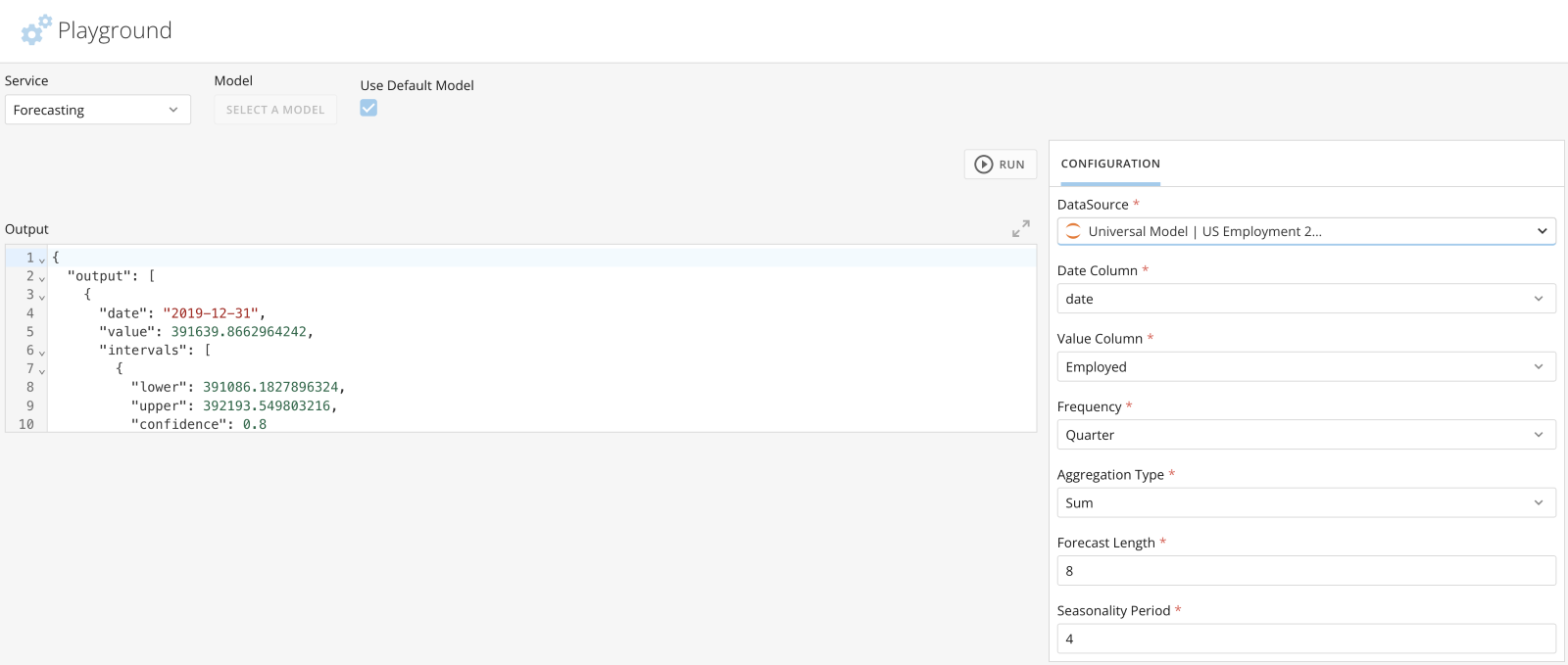
#### AI Forecasting Universal Model in the Domo. AI Playground
You can use the Forecasting Universal Model in the Domo. AI Playground to compare and test various configuration outputs. You can also extract the cURL code that generates the forecast and use the code in other settings, such as interacting with an API.
Learn how to [use the Forecasting Universal Model in the Domo.AI Playground](/s/article/000005567#use-the-forecasting-service-in-domo-ai-playground).
This feature is in limited beta. If you have questions about joining a future beta session for this feature, contact your Domo Account team.
#### AI Forecasting Universal Model in the Domo. AI Playground
You can use the Forecasting Universal Model in the Domo. AI Playground to compare and test various configuration outputs. You can also extract the cURL code that generates the forecast and use the code in other settings, such as interacting with an API.
Learn how to [use the Forecasting Universal Model in the Domo.AI Playground](/s/article/000005567#use-the-forecasting-service-in-domo-ai-playground).
 This feature is in limited beta. If you have questions about joining a future beta session for this feature, contact your Domo Account team.
### DomoStats: Groups Report
The DomoStats Groups report lists Domo groups and relevant attributes.
This report includes valuable information like:
* Group Name
* Group Type
* Created Date
* Creator Id
The Groups report can be joined with other group-related reports, such as the DataSet Access report. Learn more about [DomoStats](/s/article/360043433813).
**Note:** A previous DomoStats report provided information on group memberships. This report was incorrectly named "Groups" and has been renamed "Group Members." Learn about the [Group Members report](#domostats-group-members-report) above.
### Groups Management Updates
The Group Details page has been converted to React. Group Name, Description, Type, and Owner can now be edited in a single modal experience.
Learn more about [Groups](/s/article/360042934294) in Domo.
This feature is in limited beta. If you have questions about joining a future beta session for this feature, contact your Domo Account team.
### DomoStats: Groups Report
The DomoStats Groups report lists Domo groups and relevant attributes.
This report includes valuable information like:
* Group Name
* Group Type
* Created Date
* Creator Id
The Groups report can be joined with other group-related reports, such as the DataSet Access report. Learn more about [DomoStats](/s/article/360043433813).
**Note:** A previous DomoStats report provided information on group memberships. This report was incorrectly named "Groups" and has been renamed "Group Members." Learn about the [Group Members report](#domostats-group-members-report) above.
### Groups Management Updates
The Group Details page has been converted to React. Group Name, Description, Type, and Owner can now be edited in a single modal experience.
Learn more about [Groups](/s/article/360042934294) in Domo.
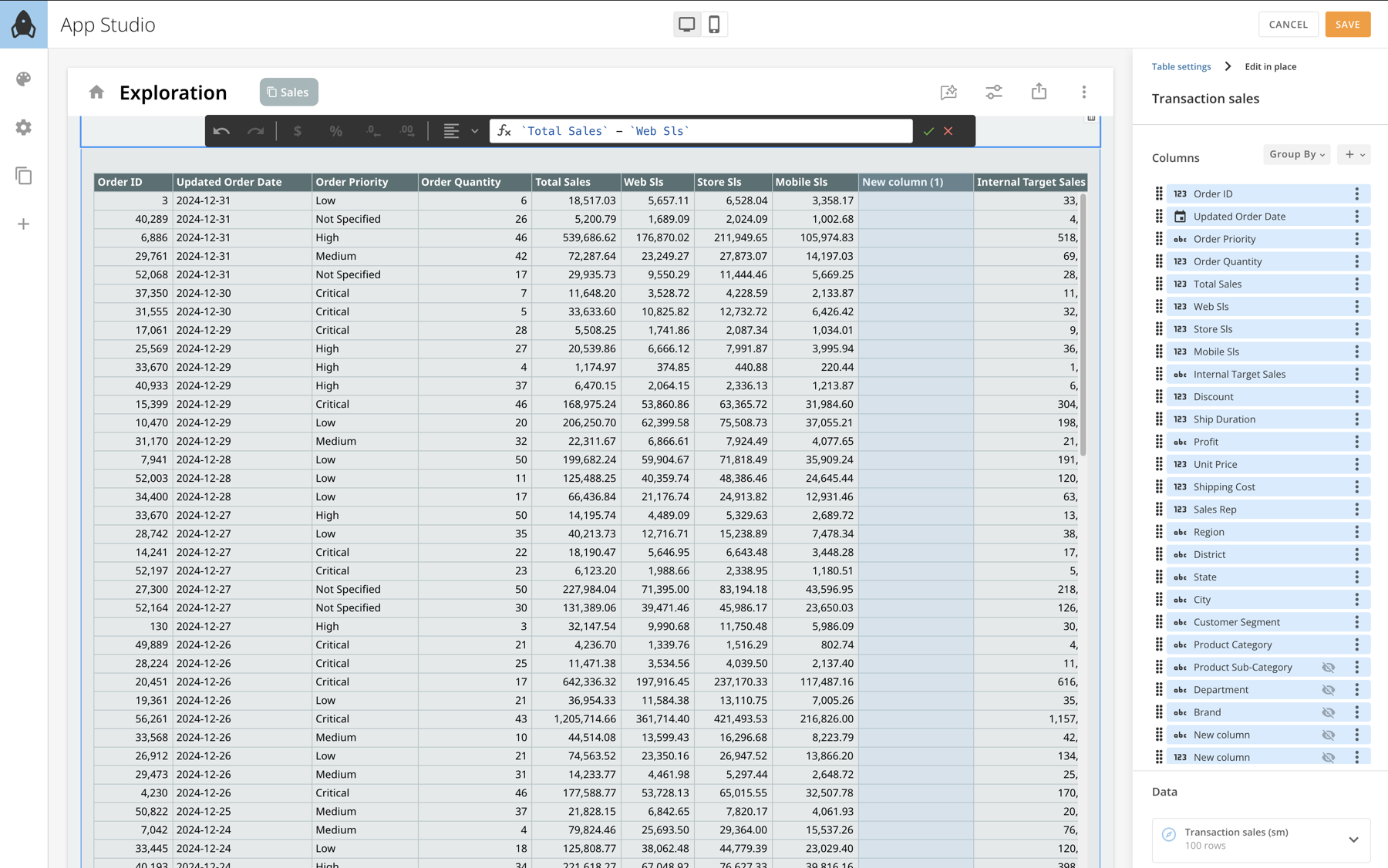
 ### New Table Element in App Studio
Data tables in [App Studio](/s/article/000005295) are now more intuitive, allowing you to explore and manipulate data like in a spreadsheet.
New functionalities include:
* Formatting
* Grouping
* Aggregating
* Sorting
* Resize columns
* Show/hide/reorder columns
* Add new calculation
### New Table Element in App Studio
Data tables in [App Studio](/s/article/000005295) are now more intuitive, allowing you to explore and manipulate data like in a spreadsheet.
New functionalities include:
* Formatting
* Grouping
* Aggregating
* Sorting
* Resize columns
* Show/hide/reorder columns
* Add new calculation
 This feature is in limited beta. If you have questions about joining a future beta session for this feature, contact your Domo Account team.
### ORDER and LIMIT Tiles in Magic ETL
The ORDER and LIMIT tiles in Magic ETL allow you to optimize how functions are performed later in the DataFlow.
* The ORDER tile allows you to specify how to order the columns in your DataFlow.
This feature is in limited beta. If you have questions about joining a future beta session for this feature, contact your Domo Account team.
### ORDER and LIMIT Tiles in Magic ETL
The ORDER and LIMIT tiles in Magic ETL allow you to optimize how functions are performed later in the DataFlow.
* The ORDER tile allows you to specify how to order the columns in your DataFlow.
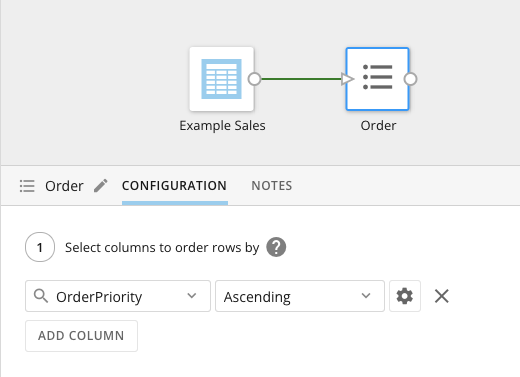 * The LIMIT tile lets you choose the number of rows in the output DataSet.
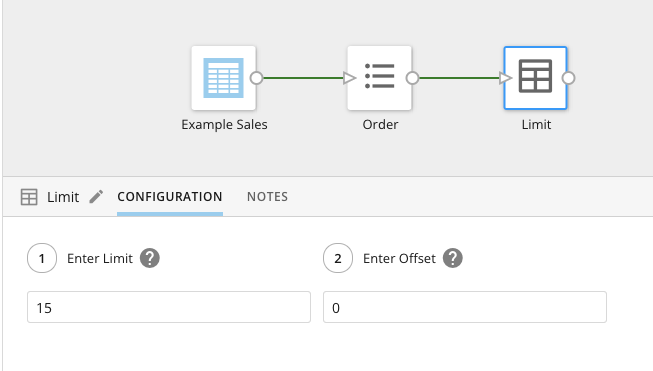 Learn about ORDER, LIMIT, and the other Magic ETL [Utility Tiles](/s/article/360044876874).
***
## Need Support?
Domo provides education, community answers, and technical support.
* Search for a topic in the
[Help Center ](https://www.domo.com/domo-central/help)
* Learn from
[Domo University ](https://www.domo.com/domo-central/university)
* Search for training apps in the
[Appstore ](https://www.domo.com/appstore/)
* Get answers in the
[Community Forums ](https://community-forums.domo.com/main)
* Contact Technical Support by entering a help ticket in the
[Domo Support Portal ](https://www.domo.com/login/customer-community)
* Reach out to your Domo account team
## Have Feedback?
If you have feedback, please send it from within Domo:
In the navigation header, select **More** >
Learn about ORDER, LIMIT, and the other Magic ETL [Utility Tiles](/s/article/360044876874).
***
## Need Support?
Domo provides education, community answers, and technical support.
* Search for a topic in the
[Help Center ](https://www.domo.com/domo-central/help)
* Learn from
[Domo University ](https://www.domo.com/domo-central/university)
* Search for training apps in the
[Appstore ](https://www.domo.com/appstore/)
* Get answers in the
[Community Forums ](https://community-forums.domo.com/main)
* Contact Technical Support by entering a help ticket in the
[Domo Support Portal ](https://www.domo.com/login/customer-community)
* Reach out to your Domo account team
## Have Feedback?
If you have feedback, please send it from within Domo:
In the navigation header, select **More** >  **Feedback.**
In the **Contact Domo** modal under **Product Feedback**, select **Go Now.**
**Feedback.**
In the **Contact Domo** modal under **Product Feedback**, select **Go Now.**
