> ## Documentation Index
> Fetch the complete documentation index at: https://www.domo.com/docs/llms.txt
> Use this file to discover all available pages before exploring further.

# Jira OnPrem OAuth Connector

## Intro

Used by millions worldwide, Jira is a tool used for bug tracking, issue tracking, and project management. The data stored within Jira can provide mission-critical information on your current production and future roadblocks.

With the Domo Jira OnPrem OAuth Connector, you can import and extract data from Jira, including issue tracking, completed tickets per team, ticket resolution time, and project management metrics, using either custom or predefined queries. You can provide analytical detail into your organization's project performance and key metrics, keeping your organization informed of critical issues across the whole portfolio of projects.

You connect to your Jira OnPrem OAuth account in the Data Center. This topic discusses the fields and menus specific to the Jira OnPrem OAuth connector user interface. To add DataSets, set update schedules, and edit DataSet information, see [Adding a DataSet Using a Connector](/docs/s/article/360042926274).

***

## Prerequisites

To connect to your Jira OnPrem OAuth account and create a DataSet, you need:

* JIRA host name
* An OAuth configuration

<Note>**Note:** To configure an incoming link for creating an enterprise OAuth app, see the Atlassian documentation: [Configure an Incoming Link](https://confluence.atlassian.com/adminjiraserver/configure-an-incoming-link-1115659067.html).</Note>

## Configure OAuth

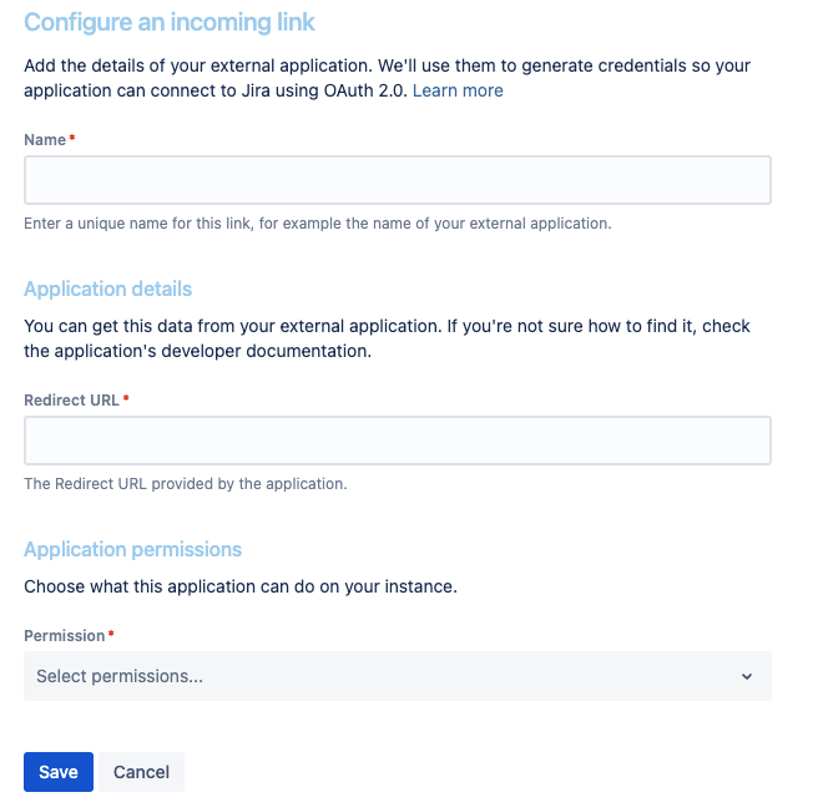
### Configure an Incoming Link

To create an incoming link:

1. Navigate to **Administration** > **Applications** > **Application links**.
2. Select **Create link**.
3. Select **External application**, and then select **Incoming** as the direction.
4. Complete the details as described in the sections below.

   <Note>**Note:** For the **Redirect URL** field, enter `https://oauth.domo.com/api/data/v1/oauth/providers/jira-on-prem-oauth/exchange`. For the **Permission** field, choose **ADMIN** from the drop-down list.</Note>

   <Frame>
     <img src="https://mintcdn.com/domoinc/tqUefIxGvx2RLcOk/images/kb/jira-on-prem-oauth-create-incoming-link.png?fit=max&auto=format&n=tqUefIxGvx2RLcOk&q=85&s=ebdae6d4bd185ff8847ec1e6d44c20c9" alt="Create incoming link form showing the Redirect URL and Permission fields" width="823" height="810" data-path="images/kb/jira-on-prem-oauth-create-incoming-link.png" />
   </Frame>

### View OAuth Credentials for an Existing Link

If you lose your OAuth credentials, you can access them at any time from the application link you created.

To view the OAuth credentials:

1. Navigate to **Administration** > **Application links**.
2. Find the application link, and select **More actions** > **View credentials**.

### Create OAuth Configuration in the Domo Instance

To create an OAuth configuration:

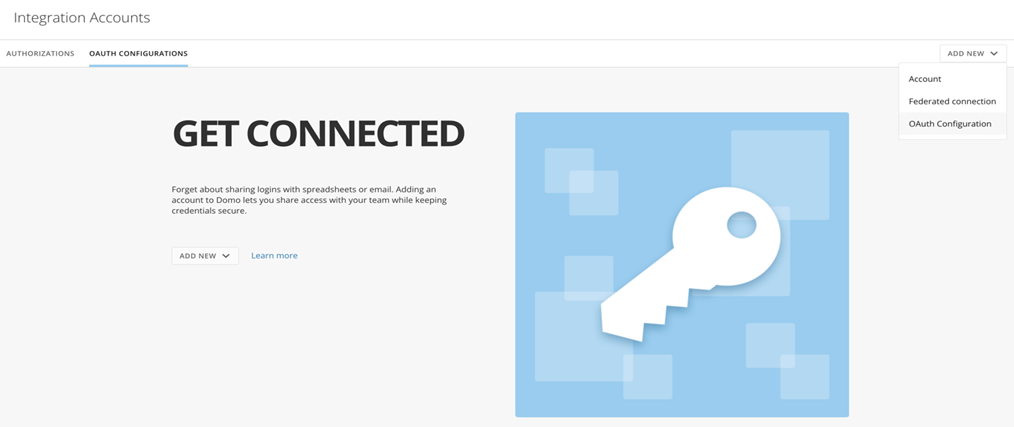
1. Log in to the customer's Domo instance.
2. Navigate to `https://{customerdomain}.domo.com/datacenter/accounts`.
3. Select **Add New OAuth Configuration**.
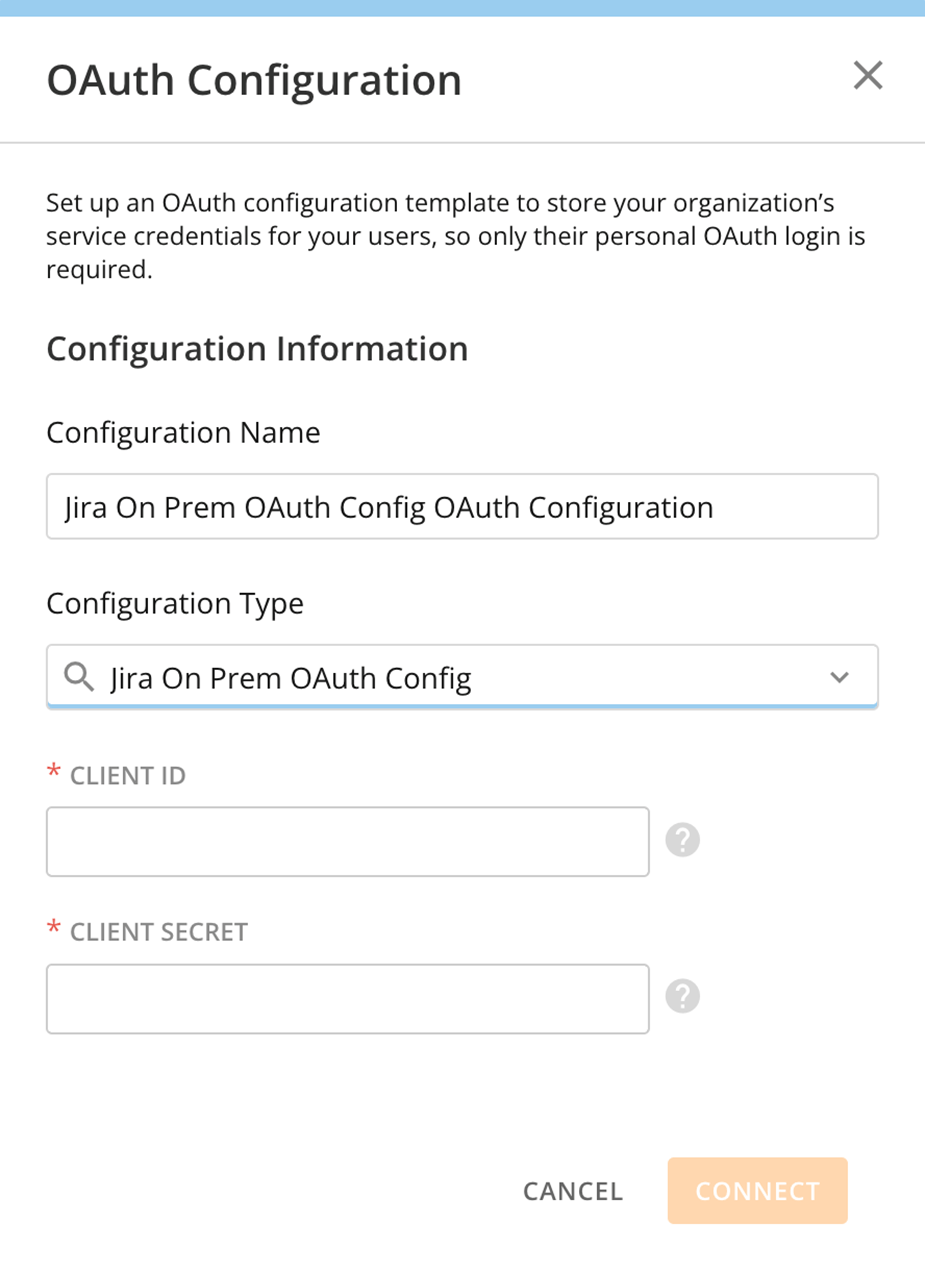
4. Select **Jira On Prem OAuth Config** as the configuration type.
5. Enter the client ID and secret generated through an incoming link, as described above.
<Frame>
  <img src="https://mintcdn.com/domoinc/tqUefIxGvx2RLcOk/images/kb/jira-on-prem-oauth-add-config.png?fit=max&auto=format&n=tqUefIxGvx2RLcOk&q=85&s=9fe9f26ffc4ea20c3efe21004dcd647c" alt="Add New OAuth Configuration dialog" width="1014" height="427" data-path="images/kb/jira-on-prem-oauth-add-config.png" />
</Frame>

<Frame>
  <img src="https://mintcdn.com/domoinc/tqUefIxGvx2RLcOk/images/kb/jira-on-prem-oauth-config-form.png?fit=max&auto=format&n=tqUefIxGvx2RLcOk&q=85&s=c67f74eb9a3dc76d06f289bd3ba58e52" alt="Jira On Prem OAuth Config configuration form" width="925" height="1273" data-path="images/kb/jira-on-prem-oauth-config-form.png" />
</Frame>

## Connect to Your Jira OnPrem OAuth Account

This section enumerates the options in the **Credentials** and **Details** panes on the Jira OnPrem OAuth Connector page. The components of the other panes on this page, **Scheduling** and **Name & Describe Your DataSet**, are universal across most connector types and are discussed in detail in [Adding a DataSet Using a Connector](/docs/s/article/360042926274).

## Credentials Pane

This pane contains fields for entering credentials to connect to your Jira OnPrem OAuth account. The following table describes each field:

| Field               | Description                                                                                                                                                                                                                                                     |
| ------------------- | --------------------------------------------------------------------------------------------------------------------------------------------------------------------------------------------------------------------------------------------------------------- |
| JIRA Host           | Enter the Jira host name. For example, `https://onjira.domo.com`                                                                                                                                                                                                |
| OAuth Configuration | OAuth Configurations have service credentials stored by your administrator that automatically log you in so that only your personal OAuth login is required. Your administrator may create and edit configurations in the Data Center, in the **Accounts** tab. |

Once you have entered valid Jira OnPrem OAuth credentials, you can use the same account at any time to create a new Jira OnPrem OAuth DataSet. You can manage connector accounts in the **Accounts** tab in the Data Center. For more information about this tab, see [Manage Connector Accounts](/docs/s/article/360042926054).

## Details Pane

This pane contains a primary **Reports** menu, along with various other menus which may or may not appear depending on the report type you select.

| Menu                    | Description                                                                                                                                                                                                                                                                                                                                                                                                                                                                                                                                                                                                                                                                                                                                                                                                                                                                                                                                                                                                                                                                                                                   |
| ----------------------- | ----------------------------------------------------------------------------------------------------------------------------------------------------------------------------------------------------------------------------------------------------------------------------------------------------------------------------------------------------------------------------------------------------------------------------------------------------------------------------------------------------------------------------------------------------------------------------------------------------------------------------------------------------------------------------------------------------------------------------------------------------------------------------------------------------------------------------------------------------------------------------------------------------------------------------------------------------------------------------------------------------------------------------------------------------------------------------------------------------------------------------- |
| Report                  | Select the report you want to run. The following reports are available:<br /><table><thead><tr><th>Report Name</th><th>Description</th></tr></thead><tbody><tr><td>Issue Query</td><td>Enables the user to query issues using JQL (Jira Query Language).</td></tr><tr><td>Fields</td><td>Returns a list of fields used in the user's Jira account.</td></tr><tr><td>Group Members</td><td>Returns a list of users that belong to the specified group. You must have admin access to run this report.</td></tr><tr><td>Projects</td><td>Returns the list of all projects for which the user has access.</td></tr><tr><td>Project Versions</td><td>Returns a list of all versions of the specified project.</td></tr><tr><td>Users Groups</td><td>Returns a list of groups for all users.</td></tr></tbody></table>                                                                                                                                                                                                                                                                                                             |
| JQL Query               | Enter a JQL query to pull custom data. See [Jira Documentation](https://confluence.atlassian.com/display/JIRA/Advanced+Searching).<br /><table><thead><tr><th>Description</th><th>Query Examples</th></tr></thead><tbody><tr><td>All issues created at the start of the month, 3 months ago.</td><td>created >= STARTOFMONTH(-3)</td></tr><tr><td>All issues created at the start of the day, 10 days ago.</td><td>created >= STARTOFDAY(-10)</td></tr><tr><td>All issues updated since a specific date.</td><td>updated >= '2020-01-01'</td></tr><tr><td>All issues assigned to me.</td><td>assignee = currentUser()</td></tr><tr><td>All issues for project 'Some Project' that are closed.</td><td>project = 'Some Project' and status = closed</td></tr><tr><td>All issues reported by a specific user.</td><td>reporter = 'user.name'</td></tr></tbody></table>                                                                                                                                                                                                                                                          |
| Data Option             | <table><thead><tr><th>Data Option</th><th>Description</th></tr></thead><tbody><tr><td>Comments Report</td><td>Returns the Jira tickets and their related comments.</td></tr><tr><td>Changelog Report</td><td>Returns the changelogs per issue applicable to the query. The Changelog report is only available to Jira Cloud users.</td></tr><tr><td>Labels Report</td><td>Returns the labels for issues applicable to the query.</td></tr><tr><td>Linked Issues Report</td><td>Returns the linked issues for issues applicable to the query.</td></tr><tr><td>Sprint Report</td><td>Returns the details of the sprints for issues applicable to the query.</td></tr><tr><td>Standard Ticket Report</td><td>Returns the columns for nearly every parameter for Jira tickets, such as issue summary and description, creation date, resolution date, impacted customer name, environment, and so on.</td></tr><tr><td>Ticket History Report</td><td>Returns the historical information about tickets.</td></tr><tr><td>Worklog Report</td><td>Returns the worklogs per issue applicable to the query.</td></tr></tbody></table> |
| Filter Type             | You can include or exclude specific fields from the returned dataset.                                                                                                                                                                                                                                                                                                                                                                                                                                                                                                                                                                                                                                                                                                                                                                                                                                                                                                                                                                                                                                                         |
| Fields                  | Enter the fields you want to filter using a comma-separated list. Entering a parent field always groups with child fields. For example, if you want to exclude the **Reporter** field, you would also exclude all fields under Reporter, such as name, email address, and so on. You cannot specify a child field to exclude, only the parent. Currently, you must enter field IDs for custom fields. Use the Fields report to see applicable fields.                                                                                                                                                                                                                                                                                                                                                                                                                                                                                                                                                                                                                                                                         |
| Flatten All Fields      | Select this checkbox to flatten all sublists.                                                                                                                                                                                                                                                                                                                                                                                                                                                                                                                                                                                                                                                                                                                                                                                                                                                                                                                                                                                                                                                                                 |
| Sublists To Flatten     | Enter the sublists to be flattened.                                                                                                                                                                                                                                                                                                                                                                                                                                                                                                                                                                                                                                                                                                                                                                                                                                                                                                                                                                                                                                                                                           |
| Group Name              | Enter the group that contains the users you want to retrieve. This report requires an Administrator account.                                                                                                                                                                                                                                                                                                                                                                                                                                                                                                                                                                                                                                                                                                                                                                                                                                                                                                                                                                                                                  |
| Agile Boards            | Select the Agile Board for which you want to retrieve data.                                                                                                                                                                                                                                                                                                                                                                                                                                                                                                                                                                                                                                                                                                                                                                                                                                                                                                                                                                                                                                                                   |
| Sprint Selection        | Shows issues that belong to the active sprint, sprints that start after a specified date, or choose from a list of sprints.                                                                                                                                                                                                                                                                                                                                                                                                                                                                                                                                                                                                                                                                                                                                                                                                                                                                                                                                                                                                   |
| Agile Sprints           | Select the sprint for which you want to retrieve the data.                                                                                                                                                                                                                                                                                                                                                                                                                                                                                                                                                                                                                                                                                                                                                                                                                                                                                                                                                                                                                                                                    |
| Sprint Start Date After | Retrieves all issues for sprints with a start date after the selected date. Issues in future sprints will also be retrieved.                                                                                                                                                                                                                                                                                                                                                                                                                                                                                                                                                                                                                                                                                                                                                                                                                                                                                                                                                                                                  |
| Project                 | Select the Jira project for which you want to retrieve the data.                                                                                                                                                                                                                                                                                                                                                                                                                                                                                                                                                                                                                                                                                                                                                                                                                                                                                                                                                                                                                                                              |
| Reset Schema            | Select this checkbox to only include columns that have been imported in the current execution.<br /><Note>**Note:** This option only works for the Replace update method.</Note>                                                                                                                                                                                                                                                                                                                                                                                                                                                                                                                                                                                                                                                                                                                                                                                                                                                                                                                                              |

## Other Panes

For information about the remaining sections of the connector interface, including how to configure scheduling, retry, and update options, see [Adding a DataSet Using a Connector](/docs/s/article/360042926274).
